Zendesk continues to develop the platform with new features and improvements. Here are the key updates from October 2026.
Accounts and billing
Notifications for automated resolution usage
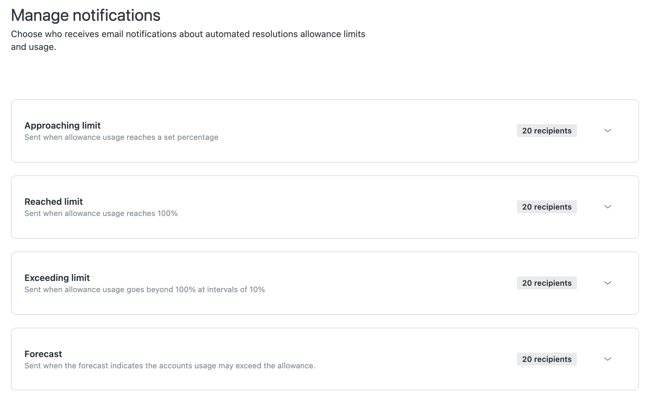
Administrators can now configure which email notifications they want to receive about automated resolutions usage and resolution allowance.
Notifications can be used both for usage tracked in the Automated resolutions dashboard and in the Resolution allowance and Resolution usage dashboards. This makes it easier to monitor usage and see when the organisation is approaching the limits of its subscription.
Increase Resolution allowance directly in Zendesk
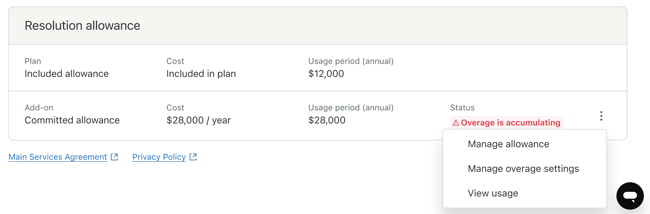
Accounts using the Resolution allowance pricing model can now increase available capacity directly from the Subscription page or the Resolution allowance dashboard.
Additional capacity is added to a shared pool that can be used across resolution tiers. This can make it easier to handle periods of higher usage without reaching the usage limit.
Support
Create multiple tickets from the same email
Zendesk now supports a workflow for emails sent to multiple support addresses on the same Zendesk account.
When the feature is enabled, a single incoming email that includes several support addresses can create separate tickets. This can be useful when different teams or departments need to handle their own part of the same enquiry.
Sender authentication is set to Minimal by default
Sender authentication is now set to Minimal by default for all accounts. The aim is to improve security while still allowing legitimate emails to be delivered as normal.
Existing customers can still manage or disable the setting in Admin Center. Eligible accounts that currently have the feature disabled will gradually be moved to the new default setting.
Improved workflow when merging tickets
Zendesk has updated the ticket merging experience. The new workflow provides better visibility, rich-text formatting, clearer status indicators, and more information about the tickets being merged.
This should make it easier for agents to check that the correct tickets are being merged, especially when several tickets are being handled at the same time.
Light agent permissions move to Roles
Administrators on plans below Enterprise now manage light agent permissions from the Roles page in Admin Center.
This replaces the previous setting in Agent Workspace and brings more access settings together in one place.
Close all open tickets at once
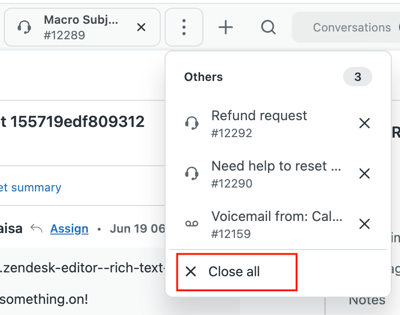
Agents working with many open tabs in Zendesk can now close all tabs with a single command.
Previously, tabs had to be closed one by one. The update makes it quicker to clear the workspace when many tickets have been open at the same time.
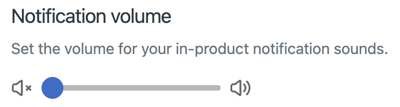
Adjust notification volume
Agents can now adjust the volume of notifications from Zendesk themselves.
The setting is personal and makes it possible to adapt notification volume to the way each individual works.
Admin Center
Improved search in Admin Center
Search in Admin Center has been improved to make it easier to find the right settings.
Search now returns better results across navigation and settings pages and also handles incomplete or less precise searches better than before.
AI agents
Voice AI agents are generally available
Voice AI agents are now generally available for customers using Zendesk voice.
AI agents can handle phone calls from start to finish in real time and transfer the conversation to an agent when needed. The solution also supports transcripts, summaries, and recordings, and Zendesk states that 53 languages are supported.
This makes it possible to use AI agents in the phone channel as well, while allowing the conversation to be transferred to a human with the history preserved.
Embedded templates for email AI agents
Embedded templates are now available for email AI agents with agentic AI.
Administrators can use predefined messages within generative procedures and combine them with conditions and integration logic. This provides more control in parts of the conversation where the content needs to be fixed, while the rest of the process can remain generative.
Segments can be used in procedures for email
Segments now also work in procedures for email AI agents.
This means the same procedure can handle different customer groups in different ways. A workflow can, for example, provide one path for one customer group and send another group to a different process or contact person.
Sensitive information can be removed from AI agent tickets
Redaction is now also available in tickets handled by AI agents.
Both manual removal of sensitive information and redaction suggestions can be used on these tickets. This means the same privacy features can be used in AI agent conversations as in standard tickets.
Migration tool for essential AI agents
Zendesk has launched a migration tool for essential AI agents.
When the tool is used, a new AI agent is automatically created in the new unified AI agent experience, with functionality that replicates the existing setup. This is intended to make the transition easier for organisations that currently use essential AI agents.
Collect structured information with Ask for details
Dialogue builder has a new block called Ask for details.
Administrators can define which information the AI agent should collect from the customer before the conversation continues. The block therefore works as a configurable form within the conversation and can be used when specific information is required to resolve the ticket or select the right workflow.
Welcome reply for email AI agents
Email AI agents now support Welcome reply.
The feature makes it possible to run logic before the AI agent takes over the email conversation. This can include conditions based on parameters or segments, actions, API integrations, or escalation.
Knowledge reply for email AI agents
Email AI agents also get a dedicated Knowledge reply that is used when no relevant use case is found.
The AI agent then searches connected knowledge sources and generates a response based on the available content. The feature is configured together with the other AI agent settings.
Copilot
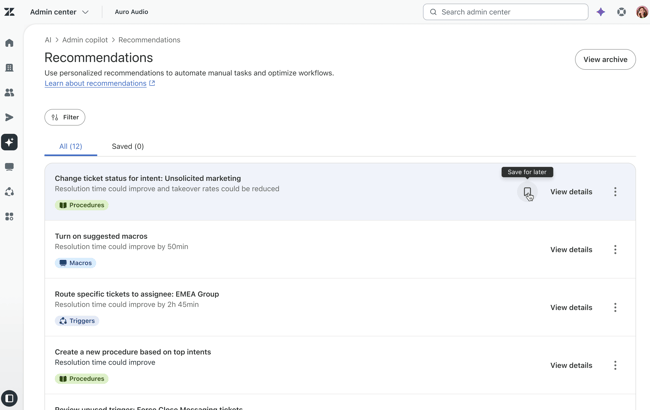
Save recommendations from Admin Copilot
Recommendations from Admin Copilot can now be saved so administrators can return to them later.
Saved recommendations are collected in a dedicated tab in Admin Center. This makes it easier to keep relevant improvement suggestions without having to follow them up immediately.
Draft mode for Auto assist procedures
Auto assist procedures can now be saved as drafts.
Administrators can therefore change, test, and manage procedures in Knowledge admin without the changes affecting the suggestions agents receive in the active environment. Previous versions can also be restored when needed.
Search Auto assist procedures
It is now possible to search the list of Auto assist procedures in Knowledge admin.
For accounts with many procedures, this makes it easier to find the right setup without browsing through the entire list.
Objects and business rules
Automatic synchronisation from Salesforce to custom objects
Administrators can now set up scheduled synchronisation of data from Salesforce to custom objects in Zendesk.
Zendesk can suggest how fields should be mapped using AI, and the setup supports features including previews, daily synchronisations, manual runs, and logs.
This can reduce manual work for organisations that use information from Salesforce as part of their workflows in Zendesk.
Better visibility into action flows
Action flows now include action logs and tracing that show how automated workflows run.
Administrators get 30 days of history and can view every step in a run. This makes it easier to identify where and why a workflow may fail.
More steps in Action Builder
The limit for the number of steps an action flow can contain is increasing from 50 to 60.
This provides room for more extensive automated workflows without affecting existing action flows.
Pause action flows with Wait steps
Action flows can now include Wait steps ranging from one minute to 31 days.
This makes it possible to build waiting periods directly into automated processes, for example before a follow-up, escalation, or the next part of a workflow. Information about the wait is also recorded in the log.
Copy action flows and individual steps
Existing action flows can now be cloned and used as a starting point for new workflows.
It is also possible to copy and paste individual steps between different action flows. This can reduce setup time and make it easier to reuse workflows that already work well.
Security
Shorter inactivity timeout
Accounts that currently have an inactivity limit of ten hours or more will be moved to an eight-hour limit.
Existing sessions lasting longer than 12 hours will also end automatically, requiring the user to sign in again. The change is intended to improve security for long-running signed-in sessions.
Knowledge
Universal Connector is generally available
Universal Connector is now generally available as a knowledge source in Zendesk.
Administrators can connect REST/JSON API-based content to Zendesk using an API key and configure, among other things, how the data should be mapped and retrieved.
The content can then be used by AI agents, Copilot, search, and generative search. This makes it possible to use knowledge stored outside Zendesk without having to move the content manually.
New connectors for external knowledge sources
Helpjuice, WordPress, and ReadMe are now generally available as dedicated knowledge sources in Zendesk.
Content from these systems can be synchronised with Zendesk Knowledge and used by AI agents, Copilot, search, and generative search.
Messaging
More natural display of AI responses
Responses from AI agents in the Messaging Web Widget are now displayed with a streaming animation, so the text appears gradually as the response is generated.
This creates a more continuous conversational experience for the customer instead of displaying the entire response at once.
Easier WhatsApp follow-up after 24 hours
Zendesk makes it easier to continue WhatsApp conversations after the 24-hour reply window has expired.
Agents can see how long the reply window remains open and find, preview, and send approved WhatsApp templates from Agent Workspace after the window has closed.
Administrators also get a dedicated WhatsApp templates page in Admin Center to manage access to the templates.
Multi-conversations becomes the default for new customers
Multi-conversations is now enabled by default for new Zendesk customers.
The feature allows end users to have multiple separate messaging conversations at the same time. Existing customers' current messaging setup will not be changed or migrated.
Contact Center
Search for users before outbound calls
Agents can now search for Zendesk users by name or phone number before starting an outbound call in Contact Center.
It is still possible to enter the number manually, but the search feature can make it quicker to find the right person and start the call.
Select a queue for outbound calls
For outbound calls, the agent can choose which queue the call should be made from.
The selection controls, among other things, which phone number the customer sees and which call flow applies. This provides more flexibility when the same team handles calls for different queues or purposes.
Voicemail in Contact Center
Contact Center now supports voicemail when no agents are available, the queue is busy, or the contact centre is closed.
When the customer leaves a message, a ticket is automatically created or updated with information about the caller, the audio recording, and the routing. A transcript can also be added.
Administrators can configure voicemail separately for each queue, including routing, tags, and transcription.
To use the feature, the Contact Center environment must be upgraded to version 1.2.8 (20260908) or later.
Voice
Voice AI agents are generally available
Voice AI agents are now generally available for Zendesk voice customers.
The solution makes it possible to automate phone calls with AI from start to finish, with real-time conversations and the option to transfer to an agent. Transcripts, summaries, and recordings can follow the conversation, and Zendesk states that 53 languages are supported.
Employee services
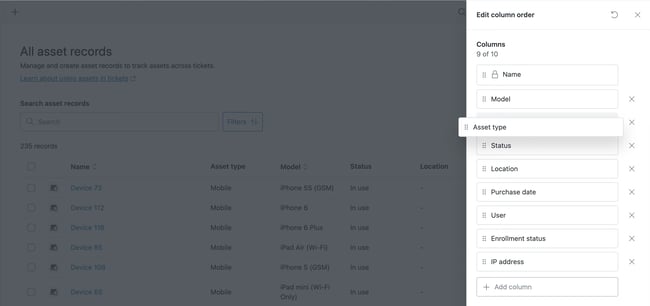
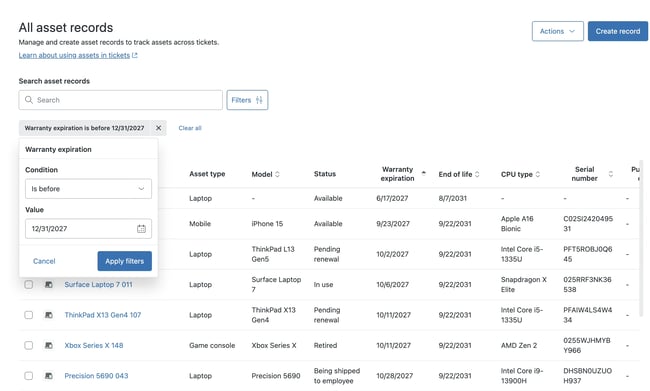
Better visibility into IT assets
The list of IT asset records can now be customised with custom columns, more advanced filtering, and sorting on both standard and custom asset fields.
This makes it easier for administrators and agents to find and organise equipment and other registered assets.
Automatic synchronisation of IT assets
IT administrators can now automatically synchronise device and asset information from Jamf Pro and Microsoft Intune to Zendesk.
Synchronisation supports features including logs, retries after errors, cancellation, and different import types. This provides better visibility into synchronisation and support for larger data volumes.
Custom roles and department spaces in Professional
Custom roles and department spaces are becoming available in Employee Service Suite Professional.
This allows administrators to control permissions and ticket access in more detail without the organisation needing an Enterprise plan.
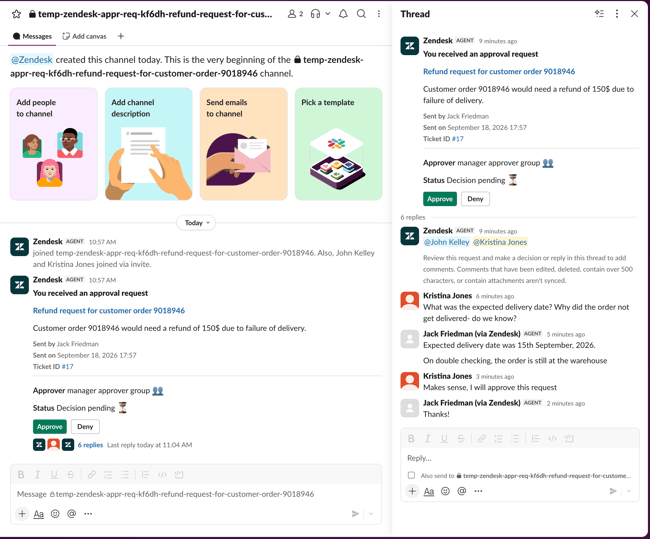
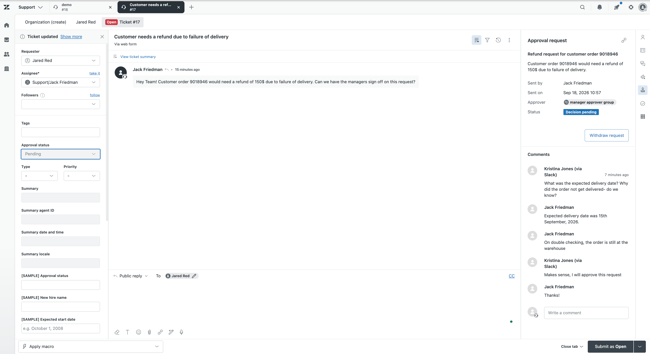
Comments on approvals from Slack
People approving a request can now add comments directly from Slack.
The comments are synchronised back to Zendesk and become part of the history that can be audited later. Administrators must reconnect the Slack integration and enable approval requests to use the feature.
Workforce management
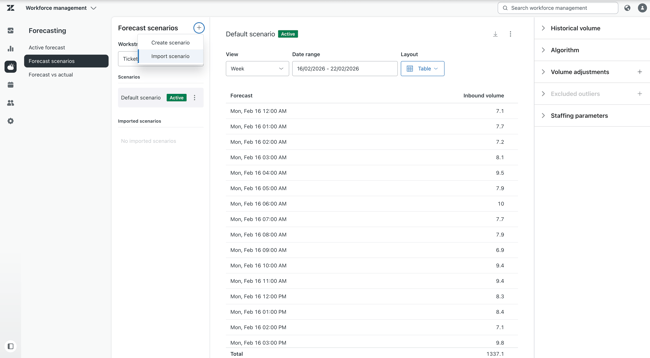
Import custom forecast scenarios
Forecast scenario imports are now generally available in Zendesk WFM.
Organisations can upload their own CSV files with forecasts for incoming volume or a combination of expected volume and required staffing.
This makes it possible to use existing planning data in Zendesk WFM and reduce the need to enter or compare information manually.
Export inbound volume from workstreams
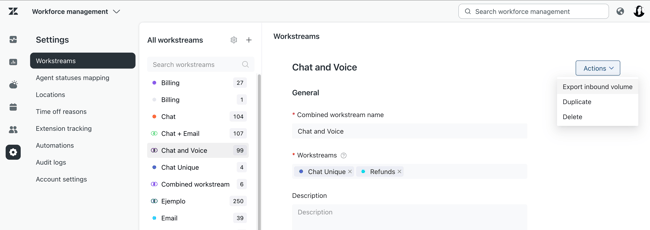
Administrators can now export a CSV file containing the tickets that entered a specific workstream during the past 30 days.
The export is requested from the workstream setup and sent by email. The data can be used, among other things, to verify volume and compare information with other planning data.
More granular WFM permissions
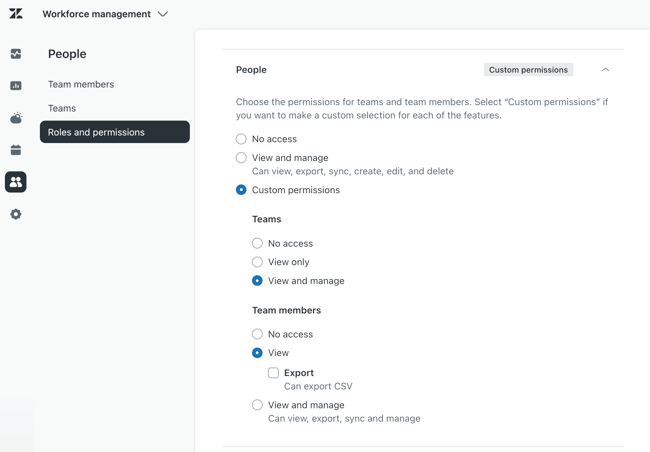
Administrators get more granular control over who can view and manage the Team members page in Zendesk WFM.
Managers without full administrator access can, among other things, be given access to specific users and manage teams, workstreams, task locks, and auto-tracking assignments within their area of responsibility.
Easier schedule imports
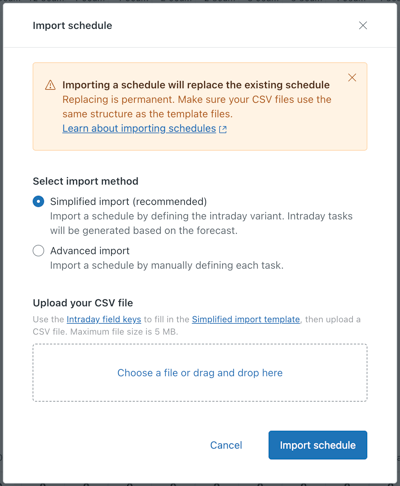
Importing schedules into Zendesk WFM with CSV is becoming easier.
The file now only needs information about the agent, intraday variant, start time, and date. Zendesk WFM then creates the correct shift automatically, instead of requiring each individual task to be defined in the import.
Quality assurance
Changes to AutoQA tone scoring
Zendesk is updating how the Tone category is calculated in AutoQA.
The change is intended to improve accuracy and help ensure that AI functionality in Zendesk complies with regulatory requirements.
QA events are recorded in audit logs
Zendesk QA now records events related to reviews, scorecards, and workspaces in audit logs in Admin Center.
This gives administrators better visibility into changes made to the QA setup and who made them.
Accuracy scores for custom prompts
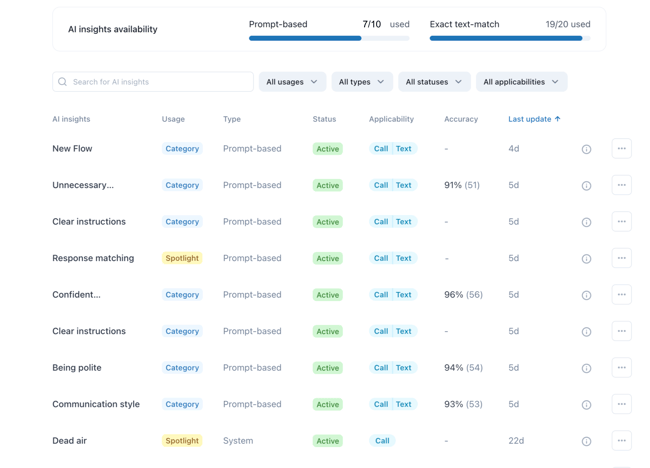
Custom prompts now have a dedicated accuracy score column.
The result is calculated by comparing AI-based scoring with the manual assessments completed for the relevant prompt. This can make it easier to monitor how well custom AI assessments are performing.
Apps and integrations
Google Sheets actions in Action Builder
Action flows can now work directly with data in Google Sheets.
It is possible to search for information, read specific rows, update existing rows, and add new ones. This makes it possible to automate workflows that use Google Sheets without having to manage the information manually outside Zendesk.
WooCommerce in Action Builder
WooCommerce now has dedicated connections and actions in Action Builder.
Workflows can create, update, and search for customers, orders, and products, among other things. This enables more automation of customer service processes for online retailers using WooCommerce.
More actions for BambooHR and Shopify
Action Builder now provides more options for working with BambooHR and Shopify.
For BambooHR, automations can manage custom tables and fields. Shopify actions can work with orders, customers, products, return options, and legal policies, among other things.
This makes it possible to build more complete HR and e-commerce processes directly into action flows.
Smartsheet in Action Builder
Smartsheet can now be connected to Action Builder.
Action flows can add, find, update, and organise information in Smartsheet sheets and rows. This can be used to automate workflows where support tasks are also followed up in Smartsheet.
New connections for ShipStation and AfterShip
ShipStation and AfterShip are now available in Action Builder.
The integrations can be used to automate workflows related to shipping, tracking, orders, and returns, among other things. This can be especially useful for online retailers that want to bring more parts of post-purchase follow-up into automated processes.
We can help you assess which of the new Zendesk features are relevant to your setup and how they can be used in practice.