Zendesk continues to develop its platform with new features and improvements. Here are the most important updates from September 2026.
Support
Link a case to multiple related records
With Multi-lookup relationship fields, administrators can create ticket fields that link a single ticket to multiple related records, such as users, organizations, assets, and custom objects. These relationships can be used in action flows and business rules, allowing multiple workflows to be automated without custom logic.
Multi-lookup fields are available in Zendesk Suite Professional and Support Enterprise.
Better overview of active messaging conversations in views
Messaging activity is now displayed more accurately in views. The "Latest Update" timestamp is updated more reliably, and a new indicator shows whether a conversation is active.
This makes it easier for agents to see which messaging tickets should be prioritized. No action is required from users.
AI translation in live chat and messaging
AI translations, which are already available for email, web forms, and the API, now also support live chat and messaging.
Translations happen in real time, allowing agents and customers to communicate in their preferred languages while the conversation is in progress.
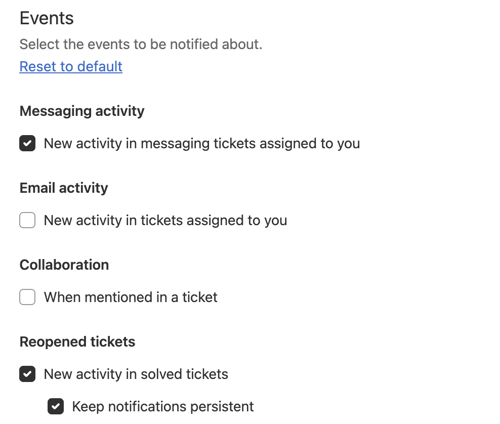
More notifications and custom notification settings
The notifications list now supports additional notifications for email tickets and reopened tickets. Agents can also manage their own notification settings in Admin Center.
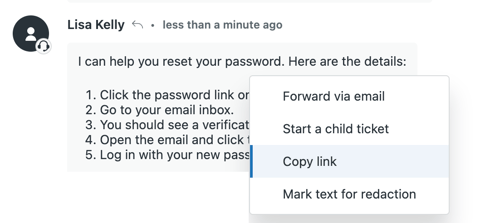
Share a link directly to a specific comment
It is now possible to create a direct link to a specific comment in a ticket and share it with others.
This makes it easier to show colleagues exactly which part of the ticket you are referring to, especially in long or complex conversations.
Customize which agent statuses are displayed
Administrators have greater control over the agent status selector. Irrelevant statuses can be hidden, and the order can be customized to match the way the team works.
Frequently used statuses can be placed at the top, while unnecessary options can be removed.
Send voice messages directly from Agent Workspace
Agents can now record, review, and send voice messages directly from Agent Workspace in messaging and email tickets.
The feature is enabled by default, but administrators can choose whether agents have access to it.
Account and Billing
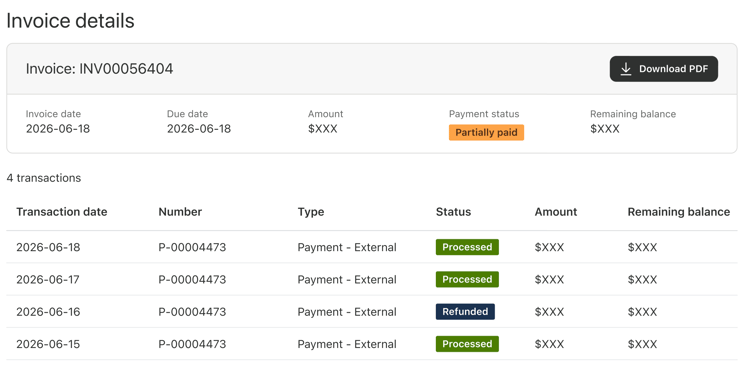
View more details about invoices
The Invoices page in Admin Center now displays more details about each invoice.
The overview includes transactions such as payments, credit memos, refunds, and write-offs. For each transaction, the page displays information including the transaction type and status, the amount, and the remaining balance on the invoice.
AI agents
Copy the entire configuration when cloning an AI agent
When an AI agent is cloned, the entire configuration is now copied. This includes procedures, actions, knowledge sources, search rules, segments, and personalization settings.
This makes it easier to use the same setup between sandbox and production environments or across different sandboxes, while ensuring that the cloned AI agent behaves like the original.
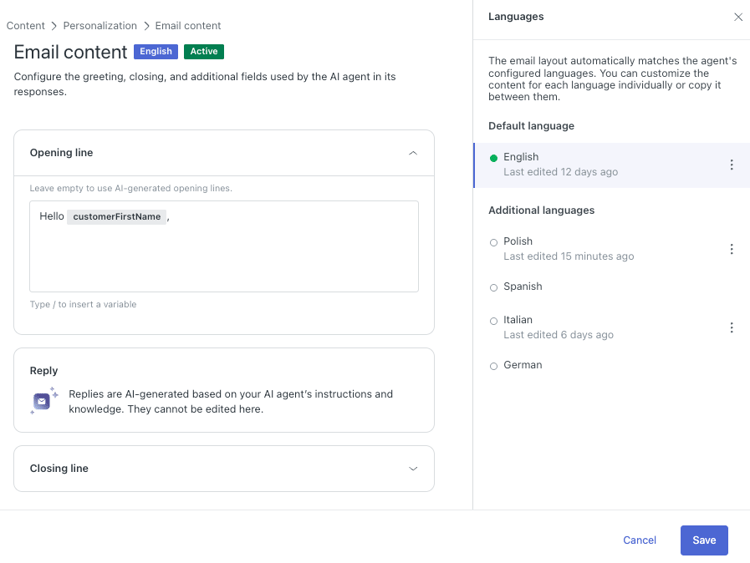
Customize the opening and closing of AI-generated emails
Administrators can define custom opening and closing lines for email replies from AI agents using agentic AI.
This provides greater control over how AI-generated emails are presented and makes it easier to maintain a consistent tone in customer communication.
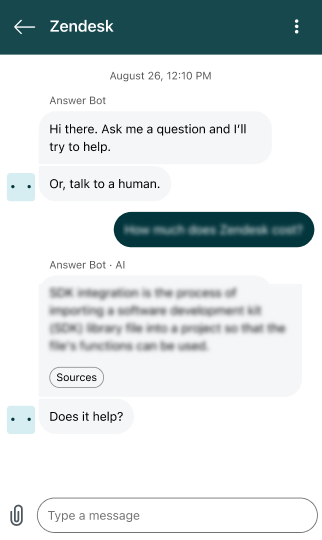
Sources are displayed separately in AI-generated replies
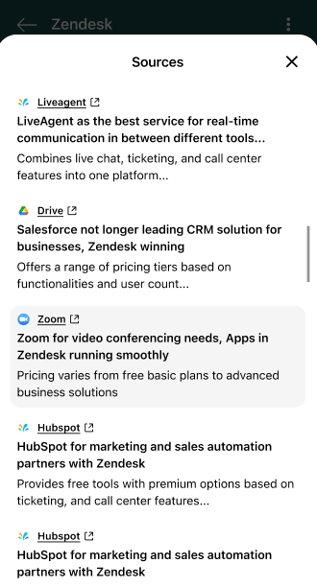
The sources AI agents use to generate responses are now displayed separately.
In Web Widget and social channels, customers can click to view the sources instead of seeing the full list directly in the response. This creates a cleaner conversation and makes the content easier to read.
 |
 |
Business hours can be used by AI agents
Schedules configured in Admin Center now also apply to AI agents. The company's business hours, time zones, and holidays can therefore be incorporated into workflows that determine when and how a conversation should be escalated.
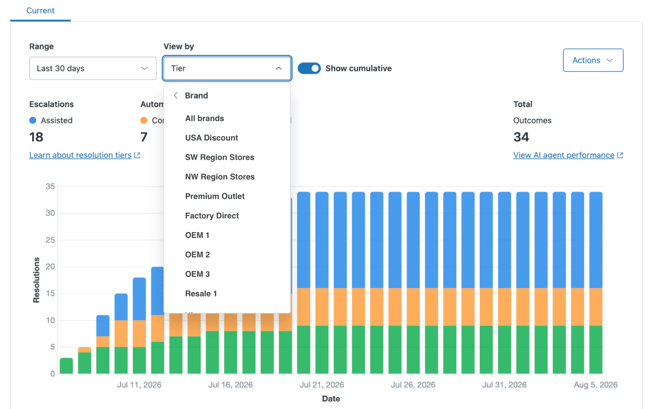
Better overview of Resolution Usage and Resolution Allowance
The Resolution Usage and Resolution Allowance dashboards now offer additional filtering options.
Data can be filtered by brand and level. In the Resolution Usage dashboard, usage data can also be exported for a selected date range.
Copilot
Merge suggestions included in more plans
AI-generated Merge suggestions are now included at no additional cost in Suite Professional, Support Professional, and higher plans.
The feature helps agents identify related tickets and suggests merging them. This can reduce duplicate work and the time spent handling duplicate requests.
Usage is calculated across all agents on the account.
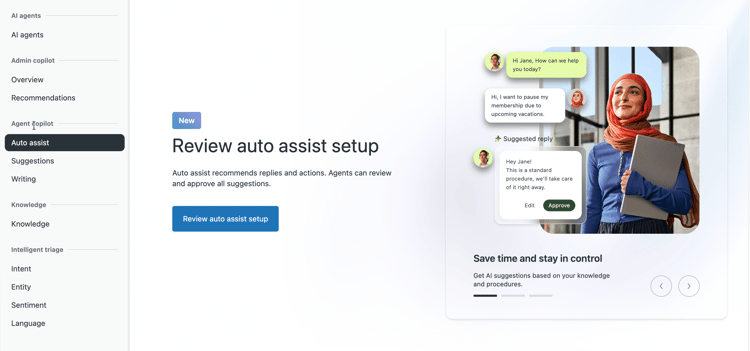
Guided Setup for Auto Assist
A guided setup for Auto assist is now available.
Administrators are guided through selecting knowledge sources, enabling access, and publishing AI-generated procedures. The setup guide is available once per account in Admin Center.
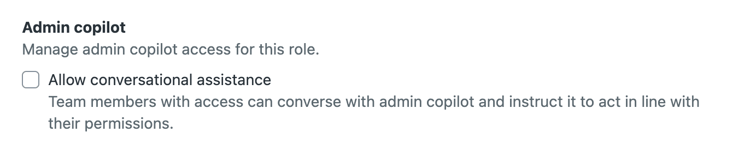
More features and improved access management in Admin Copilot
Admin Copilot now includes role-based permissions for conversational assistance. Administrators can control which custom roles have access.
An expanded view also provides more space for detailed responses, while Zendesk QA recommendations are integrated to help teams proactively improve conversation quality.
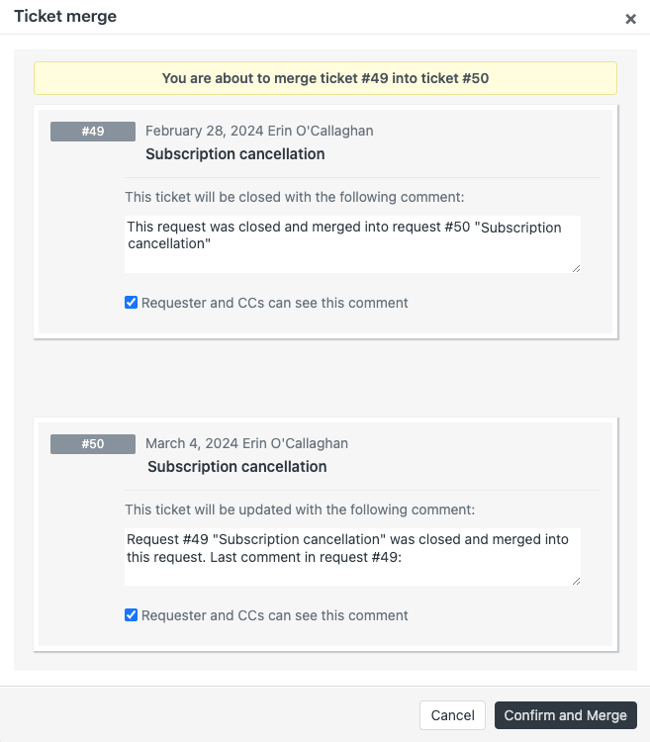
Improved search for similar tickets
Similar tickets in Copilot now uses a hybrid search model that combines keywords with semantic matching.
The feature supports all languages and channels and makes it easier to find relevant previous tickets and solutions.
Version control for Agent Copilot and Intelligent Triage
Configurations for Agent Copilot and Intelligent Triage can now be reviewed, saved, compared, and moved between sandbox and production environments.
This makes it easier to keep configurations synchronized and test changes in sandbox before deploying them to production.
Objects and Business Rules
Zendesk actions no longer use action credits
Standard Zendesk actions and external actions built by Zendesk can now be automated without using action credits.
Action credits are now used primarily for third-party connectors and custom actions. This provides greater flexibility when automating operations within Zendesk.
The AI-powered object builder is generally available
The AI-powered object builder in Admin Copilot is now generally available.
Administrators can use natural language to describe which custom objects and fields they want to create. AI then generates a suggested data model that can be refined further.
This reduces the need to build the entire structure manually.
More flexible permissions for custom object records
Administrators can now configure more granular permissions for light agents and contributors.
Access can be controlled at both the object and record level, ensuring that each role only has access to the data it needs.
Security
Separate permission for API administration
Enterprise customers now have access to a new Manage APIs permission.
This allows administrators to give developers responsibility for API and OAuth management without granting them full administrator privileges. Access can include creating, editing, and deleting API tokens, OAuth clients, and Conversations API credentials, as well as access to API analytics.
Access log webhooks
Customers with ADPP (Advanced Data Privacy and Protection) can receive access log events in near real time at an HTTPS endpoint they configure themselves.
The solution supports webhook subscriptions, event grouping, retry attempts, and delivery confirmations. This can simplify integration with SIEM solutions.
Custom suggestions for redacting sensitive information
ADPP also supports custom redaction suggestions.
Companies can create their own rules using regular expressions (regex) to identify specific types of personal data in tickets. Zendesk then flags the information in Agent Workspace so it can be more easily redacted.
Stricter password requirements
The previous Low, Medium, and High security levels for team members are being removed. Accounts will be moved to Recommended or updated Custom rules with stricter requirements.
Among other things, passwords must be at least 12 characters long and cannot resemble the user's email address.
The migration began on August 17, 2026. Team members are prompted to change their passwords after the account has been migrated to the new requirements.
Maximum session duration of 12 hours
Zendesk now enforces a maximum session duration of 12 hours for all team members.
The change is being rolled out in two phases based on existing inactivity settings. Long-running sessions will be automatically terminated, and administrators can review and adjust session expiration settings.
People
Changed visibility for Team Members
Zendesk has fixed an access issue in Admin Center for Enterprise customers.
Agents who only have the Manage end users permission can no longer view or open the Team Members page. Their access now matches the permissions they have been granted.
No action is required.
Knowledge
Salesforce and HubSpot as external knowledge sources
Salesforce and HubSpot can now be connected to Zendesk as external knowledge sources.
Content from these systems becomes available wherever Zendesk supports external knowledge content.
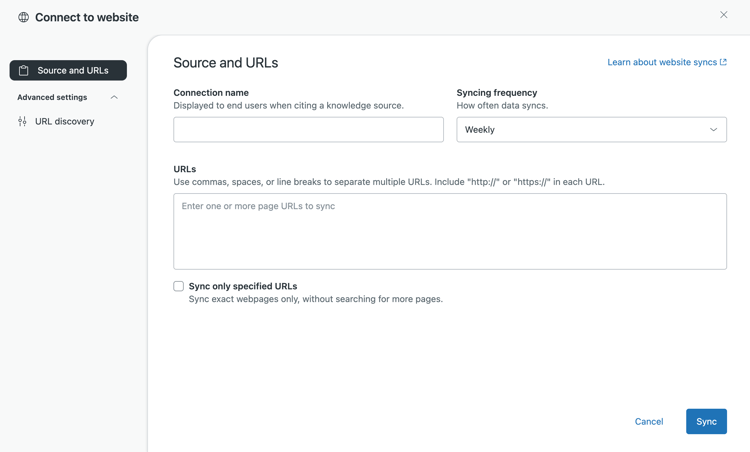
More control over content retrieved by Web Crawler
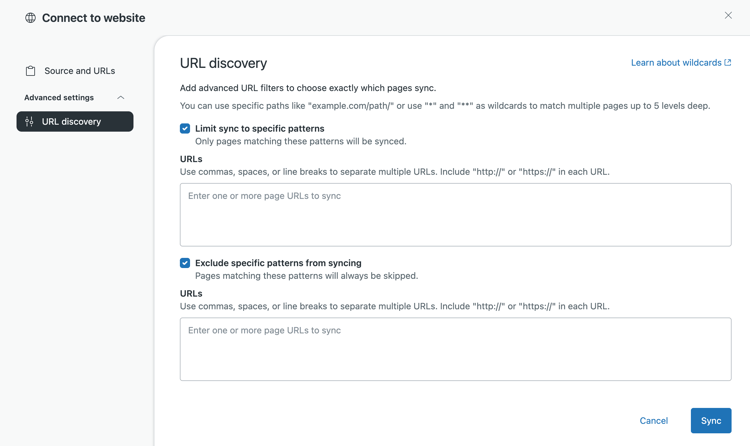
Web Crawler now offers more advanced URL filtering and custom update schedules.
Each crawler can have up to 500 starting URLs and retrieve content from multiple domains. Administrators can also determine how often the content should be updated and create up to 500 rules specifying which URLs to include or exclude.
This provides greater control over which content is used in search and AI-generated responses.
Messaging
Filter conversations by brand in Web Widget
Companies with multiple brands can now limit which conversations end users see in Messaging Web Widget.
Customers only see conversations associated with the brand they are currently communicating with. The filtering applies to the 100 most recent conversations and requires the account to use both multiple conversations and multiple brands.
Support in Mobile SDK will be available at a later date.
Support for WhatsApp business-scoped user IDs
WhatsApp business-scoped user IDs (BSUIDs) are now generally available in the Zendesk and Sunshine Conversations APIs.
The update supports WhatsApp users who are identified by a BSUID instead of a phone number as Meta rolls out usernames in WhatsApp.
BSUIDs can appear in API responses and events, and Zendesk is also updating its user identity model. This ensures that messages can still be processed when a phone number is not available.
Manage messaging triggers with Admin Copilot
Administrators can now use Admin Copilot to manage messaging triggers using natural language.
Copilot creates or modifies a suggested configuration, which the administrator can review before the changes are applied.
Pause automatic capacity reminders for specific tickets
Agents can exclude specific tickets from the automatic capacity release timer and from reminders about inactive messaging conversations.
When automatic capacity release is enabled, the Pause messaging reminders field can be added to ticket forms. The field can then be used on tickets in Agent Workspace where the team wants to retain capacity for longer.
This provides greater control over complex conversations that require extended follow-up.
Easier use of WhatsApp templates
Agents can now more easily use approved WhatsApp templates once the 24-hour messaging window has expired.
Approved templates are automatically added to the WhatsApp Templates page in Admin Center and become immediately available to agents in Agent Workspace.
A new countdown also shows how much time remains before the 24-hour window closes.
Contact Center
Agent-first callback
Contact Center now supports agent-first callback. Customers can leave the queue without losing their place. When it is their turn, Contact Center first finds an available agent and then calls the customer.
Administrators configure the callback feature in Amazon Connect.
Work in multiple browser tabs without duplicate tickets
Native Zendesk Contact Center now supports agents working in multiple browser tabs or windows.
When a call comes in, it rings and appears in all open tabs. However, Zendesk creates only one ticket for the call.
This reduces the risk of duplicate tickets and provides more accurate reporting. No action is required.
Voice
Transcripts and AI summaries as collapsible comments
Administrators using Zendesk Voice with Copilot can choose to display transcripts and AI-generated summaries as collapsible comments instead of internal notes.
This means long transcripts take up less space in the ticket and can be opened when needed.
The setting applies only to new calls. Existing transcripts and summaries retain their current format.
Analytics
Perform actions directly from the real-time monitoring assistant
The real-time monitoring assistant now supports conversational commands. This means managers can ask the assistant to perform actions directly from the monitoring workspace without having to leave it.
Custom fields in columns and filters
Search results can now be customized using custom fields in both columns and filters. Previously, this functionality was limited to standard fields. The update is available across all Support and Suite plans.
Workforce Management
More control over automatic agent statuses
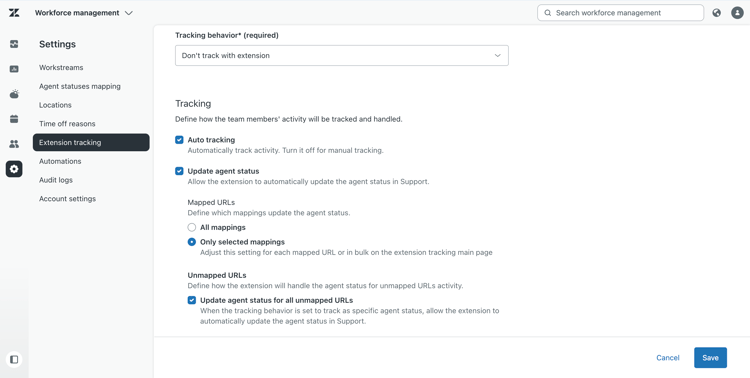
Zendesk Workforce Management gives administrators more options for controlling when activities tracked by the Zendesk WFM Chrome extension should change an agent's status.
Automatic status updates can be enabled or disabled globally, for specific URL rules, or for URLs that are not associated with a rule.
This provides more flexible time tracking and reduces the risk of agent status changes being triggered incorrectly.
Quality Assurance
Quality assurance for reviewers
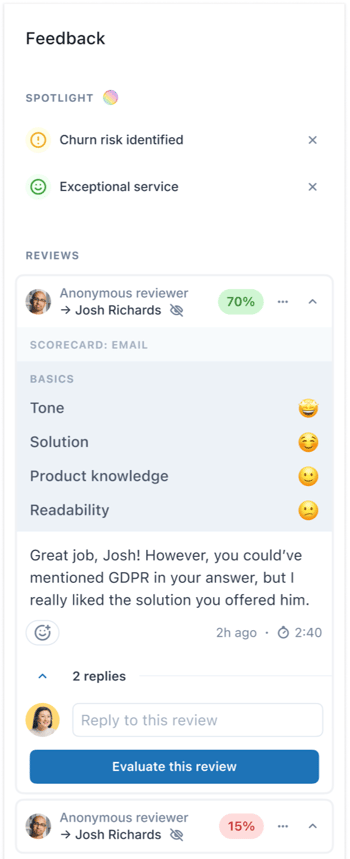
Reviewer QA assignments and the associated dashboard make it possible to evaluate the quality of the work carried out by those who review conversations in Zendesk QA.
Evaluations can be generated automatically and assigned randomly. This gives managers better insight into how accurate and consistent the reviews are and makes it easier to compare results in a structured way.
Apps and Integrations
More granular permissions for OAuth clients
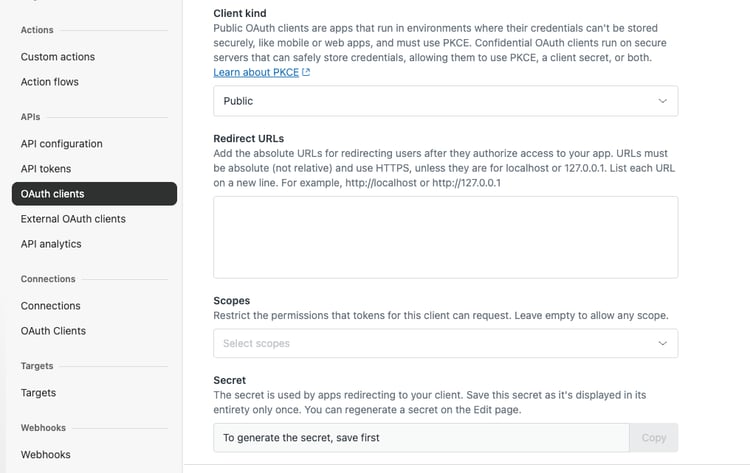
Administrators can now configure more granular scopes for OAuth clients directly in Admin Center.
This provides greater control over which resources each integration can access and makes it possible to limit permissions to only what the integration needs.
More than 50 new connectors for Action Builder
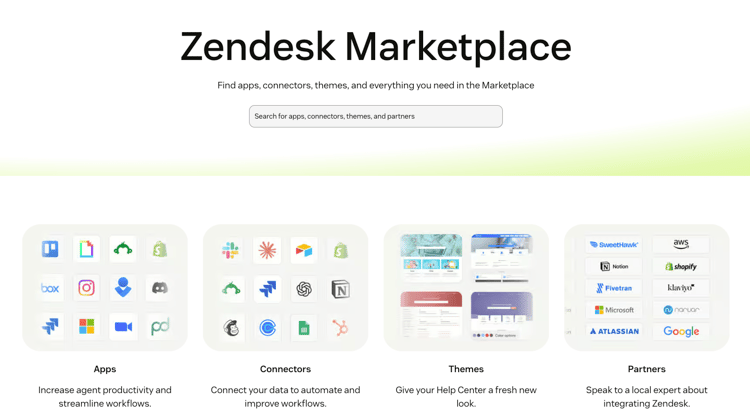
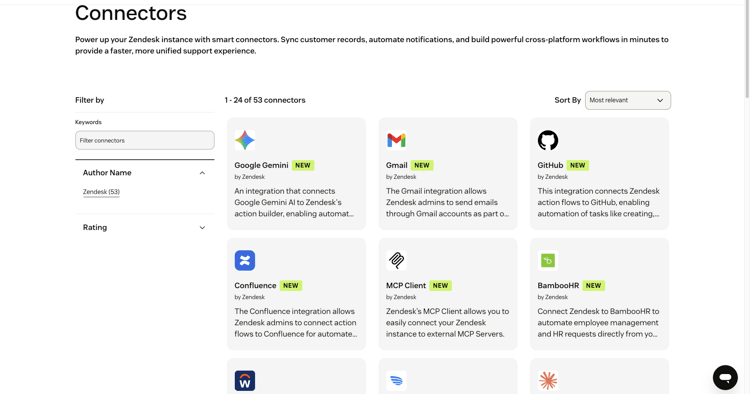
Action flow connectors now have their own section in Zendesk Marketplace.
Zendesk has added more than 50 new connectors, including Slack and Microsoft Teams. A new MCP client and an updated Marketplace interface for integrations used in automated workflows have also been released.
New connectors for ClickUp and Magento 2
Action Builder now has new connectors for ClickUp and Magento 2. The ClickUp integration makes it possible to create and update tasks as part of an action flow. Magento 2 can be used to retrieve information from the online store directly within automated workflows in Zendesk.
Centralized overview of external connections
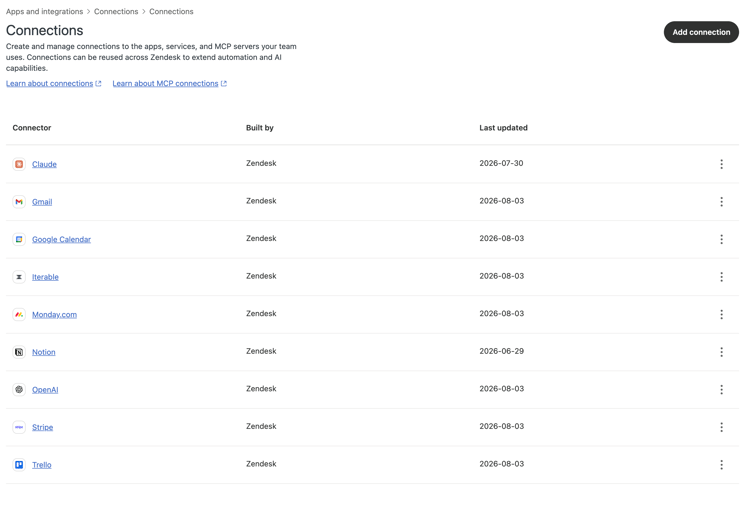
A new Connections page in Admin Center brings external system connections together in one place. Administrators can set up, manage, and maintain connections without switching between different Zendesk products.
The page includes a complete list of connections, a connector library, search functionality, detailed information, and the option to reconnect. Existing connections are migrated automatically.
The MCP client is generally available
The MCP client is now generally available.
Administrators can connect their Zendesk account to public and private MCP servers and make MCP tools available for use in action flows.
This makes it possible to retrieve information from and perform actions in external systems through action flows.
The app framework for custom object records is generally available
Developers can now build custom contextual side panel apps directly on Custom object record pages in Agent Workspace.
The apps can be tailored to different types of data and workflows, allowing agents to perform more tasks without switching between different systems or workspaces.
Employee Services
Create custom tasks and task lists directly in tickets
Agents and administrators can create custom tasks and task lists directly in tickets without requiring the tasks to be configured by an administrator in advance.
This makes it easier to track actions that are specific to an individual ticket. The tasks can also be included in automated workflows.
More flexible management of IT assets
Administrators have more options for customizing ITAM asset fields. The order of the fields can be changed for each asset type, and standard fields that agents do not need can be hidden. Events related to assets can also be used as triggers in action flows.
In addition, the Purchase cost field is changing from a decimal field to a currency field and will follow the account's billing currency.
New default fields for employees
Employee Service Suite now includes three new default user fields:
-
Job Title
-
Manager
-
Team
The fields are automatically added to all user profiles for Employee Service Suite customers.
The information can be used for purposes such as routing approvals, maintaining an overview of IT assets, and integrating with HR systems.
Convert existing tickets into service requests
Existing tickets can now be linked to items in the Service Catalog.
Both agents and business rules can use the Service field to link tickets from any channel to the correct item in the Service Catalog.
This makes it easier to organize incoming requests and automate the classification of service requests.
We'll help you assess which of the new Zendesk features are relevant to your setup and how they can be used in practice.