
Good customer service is an important part of the travel experience. For companies in transport and mobility, it is about helping customers before, during, and after the journey or service they use. With Zendesk, customer interactions can be brought together in one place, giving employees better visibility and a stronger basis for follow-up.
Customer service is part of the journey
For companies in transport and mobility, the need for help can arise at many different points. This includes airlines, bus and public transport operators, parking companies, and car- and bike-sharing services.
An enquiry may be about a booking, payment, access to a service, a delay, or a problem that prevents the customer from moving forward. In these situations, it is important that customer service can quickly understand the situation and find the right information. For the customer, it is important that the case stays connected, even when several people or departments are involved in the follow-up.
Bring customer interactions together and route the case to the right person
Zendesk is a contact center solution that brings customer interactions from channels such as email, phone, chat, and messaging into one place. Customer service employees get an overview of previous conversations and can continue the follow-up without the customer having to explain the case again.
Enquiries can be routed automatically to the right employee or team based on factors such as availability and capacity. This makes it easier to organise the work and ensure that cases are followed up by someone who can help.
For companies with their own app, Zendesk can also be embedded in the app, allowing customers to get in touch directly from the service they already use.
Give customer service the context they need while the journey is underway
When a customer gets in touch, it is often not enough to know who they are and what the question is about. The employee may also need information about the journey or service the customer is using at that moment.
This could, for example, include information about a booking or ticket, payment, an active parking session, a vehicle the customer has rented or shared, or other details relevant to the service.
Through integrations and APIs, relevant information from external systems can be made available in Zendesk. This gives the employee better context in the case and reduces the need to search across multiple systems to understand the situation.
What information can be shown, and which actions the employee can perform, depends on the systems the company uses and how the integration is configured. The goal is to make it easier to view the customer interaction and the information needed to help the customer in context.
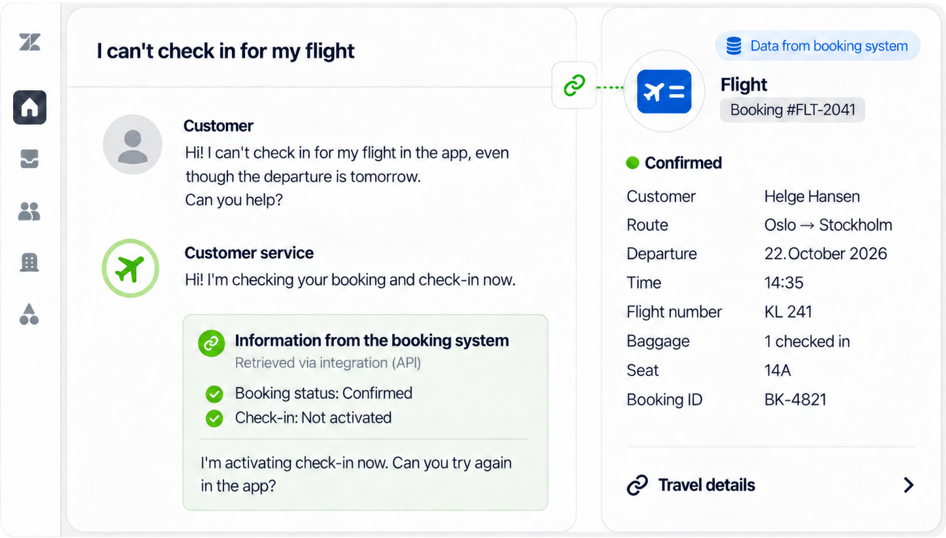
Illustration of how information from a booking system can be made available directly in the customer case. (The image is for illustrative purposes only).
Automate follow-up when the situation changes
In transport and mobility, situations can change quickly. Delays, schedule changes, or other disruptions can lead to a high volume of enquiries in a short period of time, while employees still need to follow up customers who require specific help.
In these situations, automation can help reduce manual work and make it easier to prioritise the customers who actually need help from an employee.
In Zendesk, automation and integrations can be used to retrieve information, update cases, and trigger further follow-up. With Action Builder, companies can build workflows between Zendesk and external solutions. A workflow can, for example, retrieve relevant information from another system, update the case, and start the next step in the follow-up process.
What can be automated depends on the systems connected to Zendesk and how the workflow is configured. The goal is not to automate everything, but to reduce unnecessary manual steps when many customers need help at the same time.
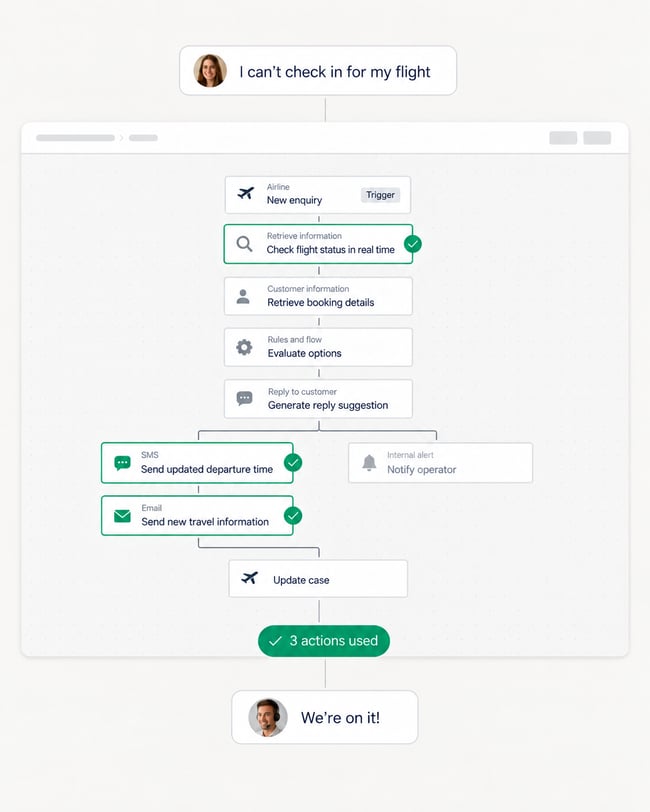
Illustration of a possible workflow where Zendesk retrieves information, updates the case, and triggers further follow-up. (The image is for illustrative purposes only).
Make answers available while the customer is on the move
Not every question needs to become a customer service case. A help center can make it easier for customers to find answers themselves when the need arises before or during a journey, or while using a mobility service.
This could include information about booking and payment, changes, using the service, access, cancellations, or what the customer should do if something does not work as expected.
With Zendesk Knowledge, companies can gather this information in a searchable knowledge base and update the content when services, procedures, or terms change. The same knowledge can be used by employees when responding to customers, helping keep information clear and consistent.
Searches in the help center can also provide insight into what customers are trying to find answers to, and where the information should be improved.
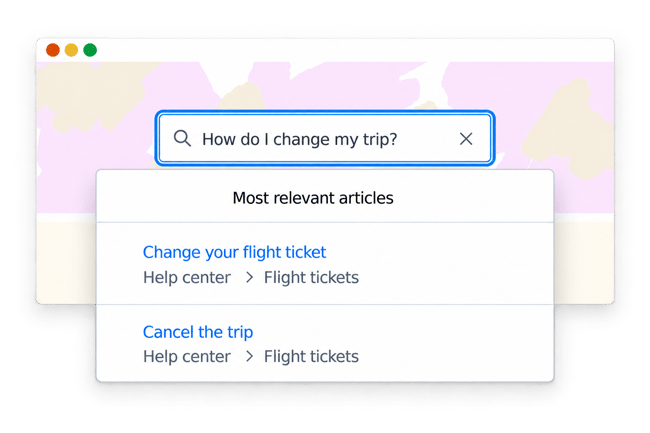
A searchable help center makes it easier for customers to find answers about their journey and changes on their own. (The image is for illustrative purposes only).
Use AI when many customers need help at the same time
Many customer service enquiries are about the same questions. AI can provide fast answers to common enquiries, allowing employees to spend more time on cases that require judgement or personal follow-up.
With Zendesk AI Agents, common enquiries can be answered automatically using the help center and other connected knowledge sources. With integrations and APIs, AI Agents can also retrieve information from external systems and perform defined tasks. If the case requires human follow-up, the information already collected can be passed on to the employee.
Zendesk Copilot can support employees by, among other things, summarising the case and suggesting responses. With Auto Assist, employees can receive suggestions for responses, actions, and next steps based on available knowledge and established procedures. This can be particularly useful when customer service volumes increase. Repetitive questions can be handled more efficiently, while employees can prioritise cases that require judgement, changes, or other human follow-up.
How much can be automated depends on the knowledge content, integrations, and workflows the company has put in place.
Read more about Zendesk AI Agents and Zendesk Copilot.
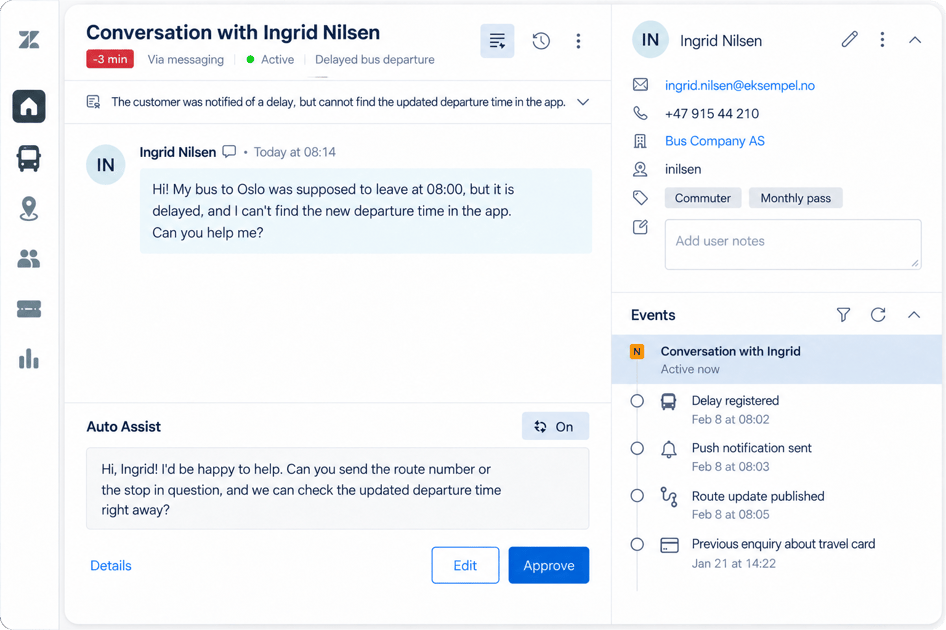
Illustration showing how Zendesk Copilot with Auto Assist can support an employee when a customer needs help. (The image is for illustrative purposes only).
See where problems arise in the customer journey
Customer interactions can also reveal where customers encounter problems in the journey or service. To gain this insight, cases need to be recorded and categorised in a way that is relevant to the company. What should be recorded depends on the questions the company wants to answer – whether they relate to enquiries about booking, payment, delays, or other parts of the service.
Zendesk reporting can then be used to identify which types of enquiries occur repeatedly, when certain problems happen more often, and where customers frequently need help.
If many customers get in touch about the same problem or at the same point in the customer journey, this can provide a stronger basis for investigating what should be improved. This could be the information customers receive, a workflow, a help center, or the service itself.
In this way, customer interactions are not just something to be handled. They can also provide useful insight into where the company should take a closer look at the customer experience.
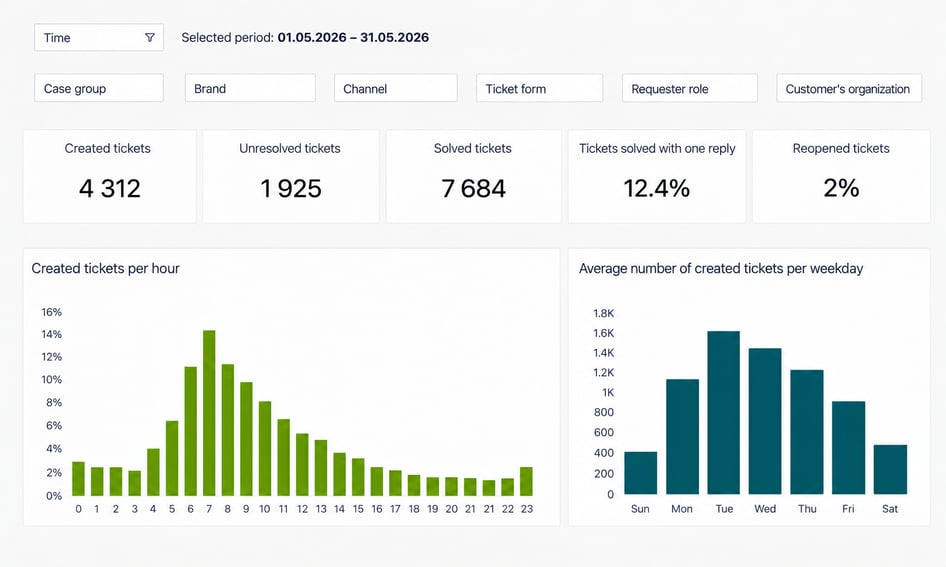
Zendesk reports can provide an overview of case volume, when enquiries come in, and other key customer service metrics. (The image is for illustrative purposes only).
Start with the company’s needs
Zendesk offers many possibilities, but everything does not need to be implemented at once. A natural starting point is to bring customer interactions together, establish clear ownership, and give employees the information they need to help customers.
From there, automation, help center content, AI, and integrations can be added where they create value. The right setup depends on the services the company offers, the systems already in use, and how customer service works with the rest of the organisation.
At Kundelab, we help companies implement and adapt Zendesk to these needs. The goal is a clear solution that works in day-to-day operations and can be developed further as needs change.
Summary
Good customer service in transport and mobility is often about being able to help the customer there and then. When a journey is underway, a service is being used, or something does not go as planned, the employee needs to quickly understand the situation and find the information required.
Zendesk can bring customer interactions together and connect them more closely with information from the systems around the service. Automation, self-service, and AI can help when many customers need assistance at the same time, while reporting can show where questions and problems tend to recur in the customer journey.
How the solution should be configured depends on the services the company offers, the systems already in use, and how customer service works in practice.
Would you like to know how Zendesk can be used in your company? Contact one of our Zendesk experts for a no-obligation chat.