
1
Send the request from Zendesk
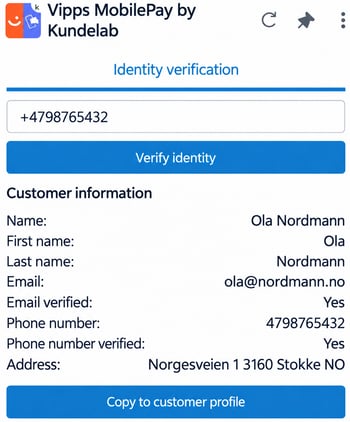
The agent starts the identity verification directly from the side panel in the Zendesk ticket. The customer’s phone number can be retrieved automatically from the customer profile or entered manually.
2
The customer confirms their identity
The customer receives the request and approves it in Vipps in Norway or MobilePay in Denmark and Finland. Vipps MobilePay Login uses the phone number as an identifier and does not require BankID.
3
View verified customer details
Once the customer’s identity has been verified, their details are displayed directly in Zendesk. Depending on the customer’s consent and the company’s Vipps MobilePay agreement, this may include their name, email address and phone number.
4
Copy the details to the customer profile
When this feature is enabled, verified details can be copied to the customer profile in Zendesk. This reduces the need to enter customer information manually.
5
Document the identity verification
When this feature is enabled, the identity verification can be logged as an internal comment in the ticket. This documents the verification internally without displaying the comment to the customer.
6
Decide who can use the app
Access to the app can be restricted based on roles and groups in Zendesk. This gives the company control over which employees can perform identity verifications.
Simple identity verification during customer interactions
Vipps MobilePay by Kundelab is integrated into the Zendesk workspace. The agent can therefore verify the customer’s identity without switching systems or carrying out a separate check.
To use the app, the company must be registered with Vipps MobilePay. The app is then installed and configured in Zendesk.
Find more information and install the app here: