Zendesk continues to develop its platform with new features and improvements. Here are the key updates for November 2026.
Support
Create subtickets and link tickets to tasks
Agents can now link existing tickets to tasks or create subtickets directly from task lists. From the main ticket, they can track who is responsible, the status, and progress.

Change the brand on closed tickets
Admins can now change the brand on a closed ticket without reopening it. This makes it easier to keep historical data, reports, and audit records accurate.
Send approval requests to several people at once
An approval request can now be sent to up to five people at once. They can respond independently and in any order.
The request is only approved when everyone agrees. If anyone declines, the remaining requests are withdrawn.
Combine email attachments with secure downloads
Standard email attachments can now be enabled alongside secure downloads. Agents can send files as attachments, while oversized files are still shared as Zendesk-hosted links that require authentication to download.
Use multiple task lists in one ticket
Agents can now add up to five separate task lists to a ticket. Lists can be created from templates or customized manually, and each list has its own status tracking and support for subtickets.
Clearer notifications for new task lists
A numbered badge in the ticket context panel now shows active task lists that the agent has not yet viewed. The notification appears as soon as the lists are added.
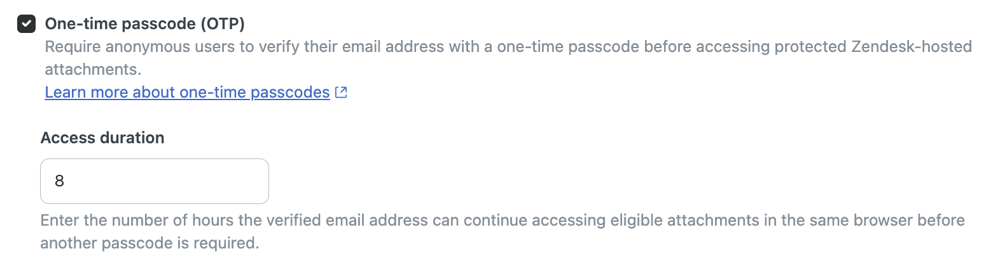
One-time passcodes for access to attachments
Admins can require recipients who are not signed in to verify their email address with a one-time passcode before accessing ticket attachments stored in Zendesk.
AI agents
Edit and take over AI agent tickets
Admins and agents with the required permissions can now add internal notes, tags, and custom field updates while an AI agent conversation is ongoing. They can also take over the ticket to hand control to a human.
Procedures move from visual maps to plain text
Generative procedures for AI agents will soon be written in plain language instead of visual procedure maps.
For now, text versions are available to read. Text editing will be available later, and no action is needed yet.
AI agents can read images and PDFs in email
AI agents with agentic AI can now read image and PDF attachments in customer emails. They can extract relevant details, assess visual content, and use the information to resolve the inquiry without manual review.
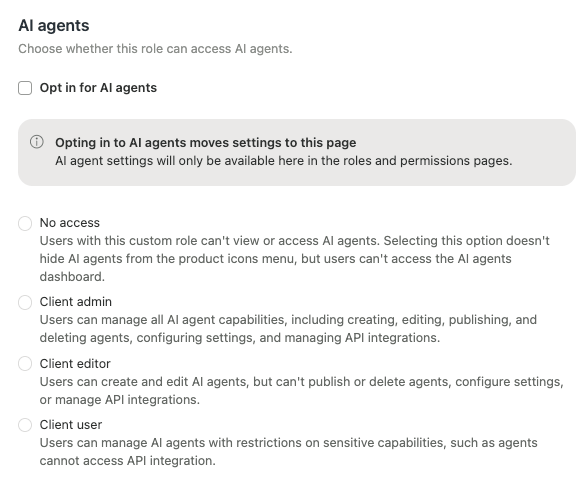
Control access with custom roles
Access to AI agents can now be managed through custom roles. Admins can set access for everyone in a role and manage permissions from Roles and permissions, rather than updating each team member separately.
Simpler navigation in the AI agents workspace
Navigation in the AI agents workspace has been simplified. Tools in the left sidebar are grouped around key tasks, from setting up the first AI agent to ongoing improvements and further development.
Connect proactive messages to AI agents
AI agent use cases can now be connected to proactive messages in the Web Widget and mobile SDK channels. When a customer responds to a message, the conversation is automatically sent to the selected AI agent use case.
Copilot
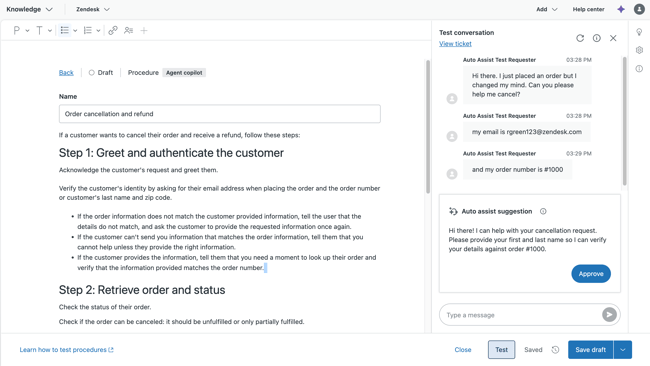
Test procedures before publishing
Admins can now test unpublished procedures and draft changes for auto assist directly in the procedure editor in Knowledge admin.
They can simulate customer conversations, review suggestions and explanations, and adjust procedures before publishing, without creating separate test tickets.
Auto assist recognizes attachments
Auto assist can now recognize attachments in ticket comments and messaging tickets, including file names and extensions. This improves the basis for reply and action suggestions in workflows that depend on attachments.
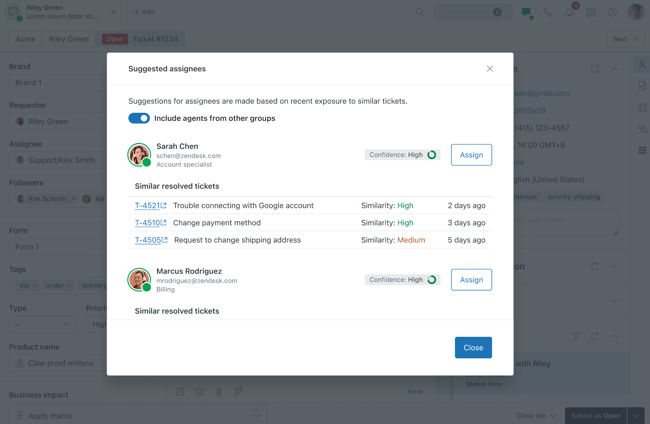
Suggestions for who should handle the ticket
Suggested assignees gives agents ranked recommendations for who should handle a ticket when it is reassigned or escalated.
Similar tickets included at no extra cost
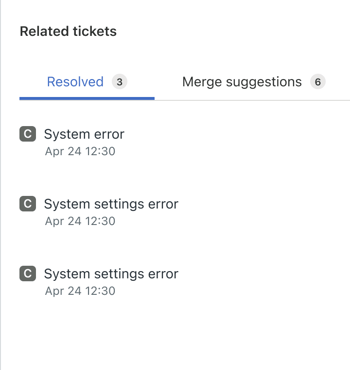
The Copilot similar tickets feature is now included at no additional cost in Suite and Support Professional plans and above.
The feature shows recently solved tickets that match the current inquiry, helping agents reuse solutions that have worked before.
Customize summaries of tickets and calls
Admins can now define what information AI-generated ticket and call summaries should include, as well as their tone and format.
Instructions can be linked to tags, and a default can be set for tickets that do not match the tag-based instructions.
Intelligent triage moves to standard fields
Legacy custom ticket fields for topic, language, and sentiment in intelligent triage are moving to standard fields. The migration is scheduled from October 26 to December 4, 2026.
Workflows that use intelligent triage tags must be updated to use the corresponding standard fields.
Objects and business rules
Create action flows with AI
Admins can describe an automation in plain text and generate a visual workflow that can be edited further. It can include triggers, conditions, branches, native actions, and custom API-based actions.
Easier testing of action flows
Recent tickets or sample users can now be used to populate test fields automatically. This reduces the need to enter IDs manually and makes it faster to validate workflows.
Reorder steps with drag and drop
Admins can now reorder steps in Action Builder using drag and drop, including branches and loops. Steps no longer need to be deleted and recreated.
Built-in checks prevent invalid placements.
Find flows with search, filters, and sorting
The list of action flows in Admin Center now supports search, filters, and column sorting. This makes it easier to find specific workflows and organize the overview.
More options for conditions
Action Builder now supports AND/OR logic and two levels of condition grouping in workflow triggers. This makes it possible to combine more advanced routing rules in a single workflow.
Ready-to-use OAuth connection to the Zendesk API
Custom actions now have a ready-to-use OAuth connection to the Zendesk API. This removes the need to set up a separate client and speeds up configuration.
The update is automatically available on all eligible plans.
Retrieve ticket comments directly in workflows
The new List Ticket Comments action lets admins retrieve ticket comments without custom actions, webhooks, or separate API calls.
The action supports public replies, internal notes, sorting, limits, and comment metadata that can be used later in the automation.
Email alerts when action flows fail
Admins can now receive email alerts when a workflow in Action Builder fails. Recipients can be configured so that the right teams are notified immediately.
Require unique values in custom objects
Fields in custom objects can now be configured to allow only unique values. This prevents duplicates and lets the fields serve as external identifiers for finding, updating, or deleting records.
Admins can enable this for field types that support the feature.
Allow access to custom objects without signing in
Admins can enable anonymous access to a custom object and choose which fields customers who are not signed in can see.
For example, a customer submitting a product complaint can select the product the inquiry concerns directly in the ticket form.
Accounts and billing
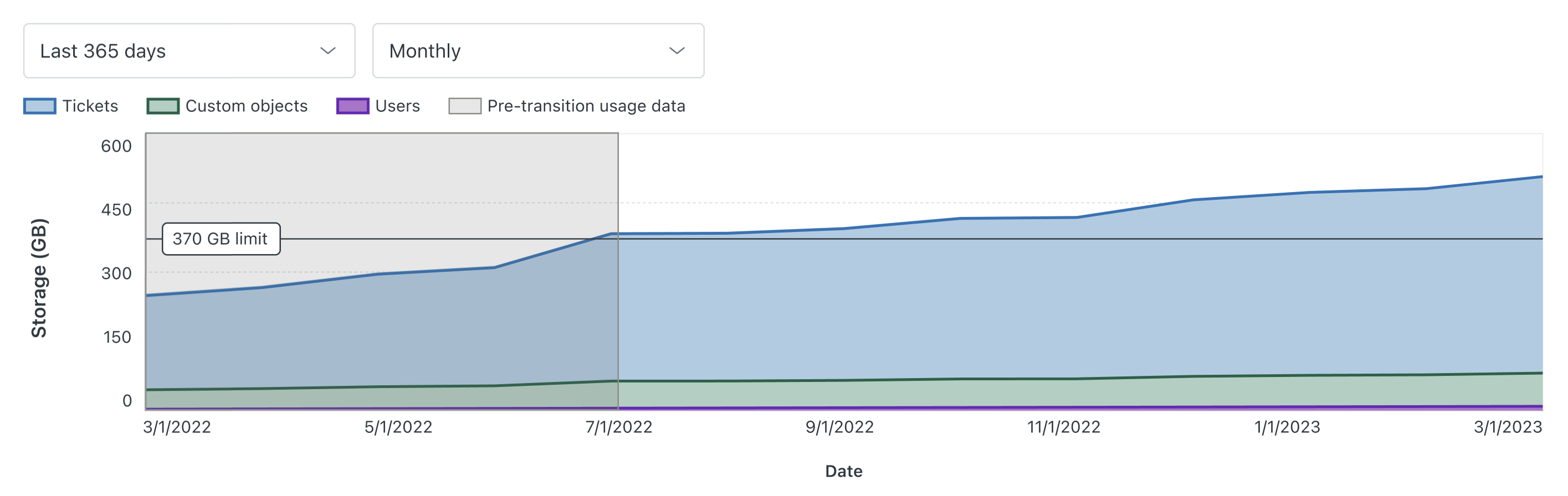
More accurate storage usage calculations
Storage usage reporting in Admin Center is being updated with a more accurate calculation method. As a result, customers may see different usage figures than before.
Historical data is available until November 18, 2026.
Security
Mask personal information in ticket comments
Admins can now extend data masking to names, phone numbers, and email addresses in Support ticket comments.
They can choose whether masking applies only to user fields or also to comments. The feature is part of the ADPP add-on.
People
Manage end user settings without full admin access
The new Manage end user configuration permission can be added to custom roles. It lets selected team members change end user settings in Admin Center without full admin access.
The permission covers access, authentication, registration, allowlists and blocklists, account emails, profile and password editing, organization settings, and more.
Change agent status automatically after missed assignments
Admins can configure omnichannel routing to change an agent's unified status after a specified number of consecutive missed voice or messaging assignments.
This helps route inquiries to other agents faster.
Delegate brand management
The new Manage brands and Delete brands permissions let department managers and team leads manage brands without full admin access.
The permissions can apply to all brands or only those assigned to the team member.
Knowledge
More external knowledge sources
Front, KnowledgeOwl, Kustomer, Stoplight, Gong, Dynamics365, Linear, Shopify, Zammad, Airtable, Comm100, Halo, ServiceNow, Stonly, and Vimeo are now available as external knowledge sources.
The content can be connected to Zendesk and used by AI agents, Admin Copilot, help center search, and generative search.
Upload knowledge from CSV files
Knowledge admins can now upload CSV files as external knowledge content when no ready-made connector or REST API is available.
Rows in the file become external content records that can be used by AI and search in Zendesk.
Translate multiple articles at once with AI
Enterprise users can now use AI to translate multiple help center articles at once from the new editor.
Articles can be translated into several supported languages at the same time, with specific terms excluded from translation.
Expanded support in the Universal knowledge connector
The Universal knowledge connector now supports OAuth 2.0 client credentials for compatible REST/JSON sources.
AI can also help map fields and configure content retrieval across multiple pages. This makes it easier to connect and synchronize external knowledge content.
Contact Center
See a summary before answering a call
Incoming call notifications can now show a summary before the agent answers.
The context can come from custom text in the contact flow or a ticket summary generated by Copilot.
More flexible after-call work
After Call Work in Contact Center has been updated so that agents can complete wrap-up from the ticket call bar while keeping workspace information visible.
Agents can also start an outbound call before returning to receive incoming calls.
Workforce management
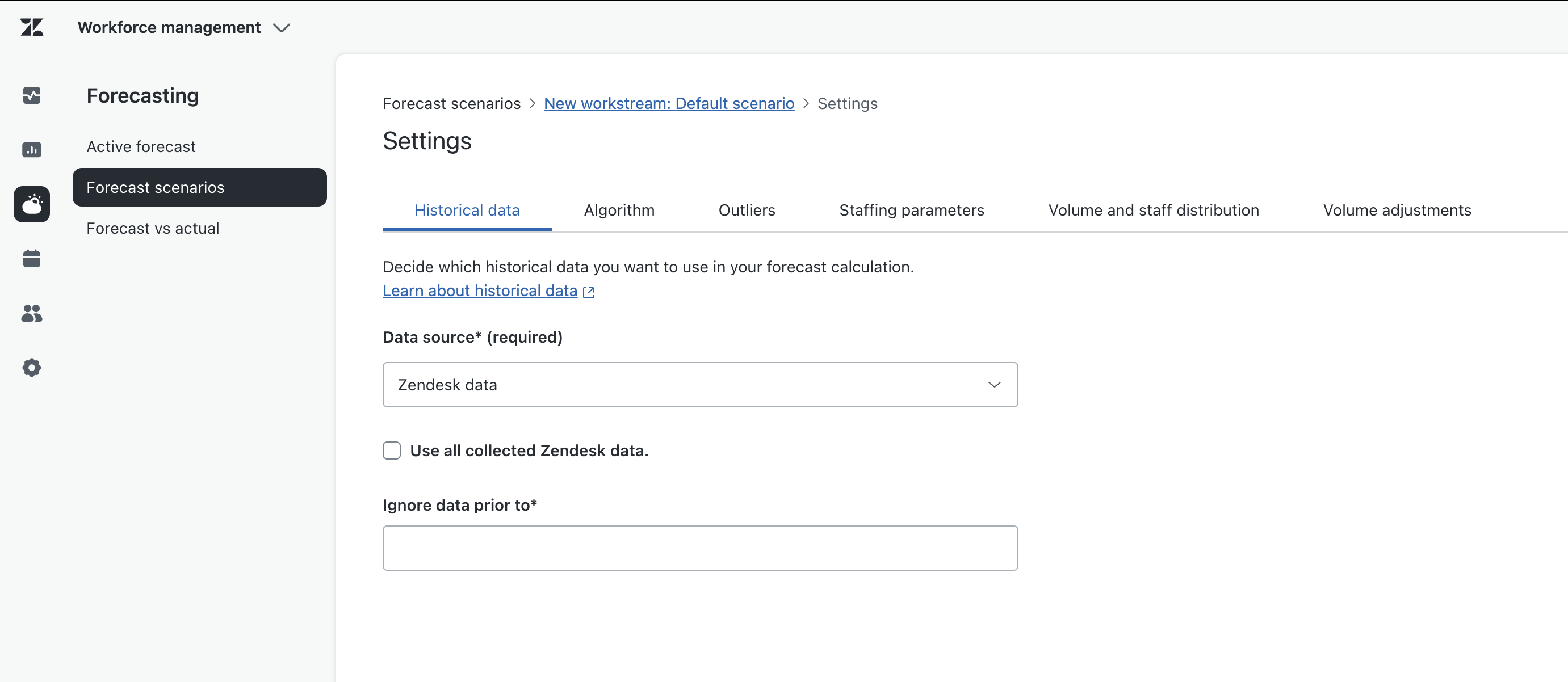
A dedicated page for forecast settings
Forecast settings in Zendesk WFM now have a dedicated page. Admins can manage settings for different scenarios separately from the forecast view itself.
Related settings are grouped into clearer sections, making scenarios easier to configure and extend.
Quality assurance
A clearer overview in Spotlights
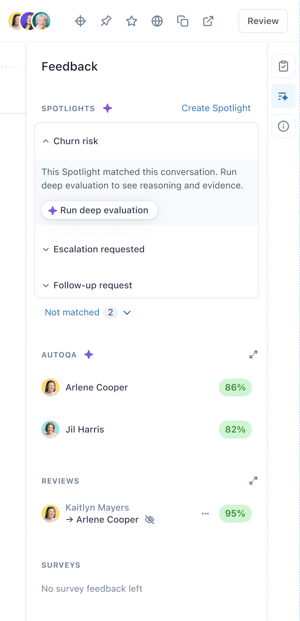
Spotlights in Zendesk QA now includes the option to turn system spotlights on and off, along with a cleaner conversation view.
Conversations without a match are collected in a separate Not matched panel. Deep evaluation and verification can be started when needed.
Apps and integrations
Support for Jira Data Center 11.3 LTS
Zendesk Support for Jira now supports Jira Data Center 11.3 LTS. After upgrading, customers can still create and link issues, synchronize fields, and use a dedicated integration user.
QuickBooks Online and Xero in action flows
QuickBooks Online and Xero are now available as connectors in action flows. Workflows can find and update accounting records directly from Zendesk.
This makes it easier to handle billing-related tasks consistently and reduces the need to switch between systems.
Updated AI models from OpenAI, Gemini, and Claude
The OpenAI, Gemini, and Claude connectors now support the latest models. The model selection adapts dynamically to the connected account, so newly supported models appear automatically.
Trello and Jira Service Management in action flows
Admins can now build workflows with connectors for Trello and Jira Service Management.
Workflows can manage cards and requests, including comments, assignments, approvals, and lookups.
More flexible Salesforce actions
Salesforce actions in action flows now support custom fields and both standard and custom objects.
Admins can connect Salesforce data and automate workflows more flexibly across accounts, contacts, leads, opportunities, cases, and campaigns.
We help you assess which new Zendesk features are relevant to your setup and how to use them in practice.