
More customers usually mean more questions about logins, accounts, subscriptions, features, and technical issues. For SaaS and software companies, Zendesk can bring customer interactions together in one place while helping support teams work more efficiently with AI, automation, and integrations. That makes it easier to stay in control as both the customer base and the product grow.
Customer service spans the entire customer relationship
For a SaaS company, the work doesn’t stop when a customer purchases a subscription. The software needs to be set up, adopted, and supported over time.
Customer needs also change along the way. New customers may need help with setup and user access, while others have questions about features, integrations, or something that isn’t working as expected. Following a product update or launch, many similar questions may arrive within a short period.
When conversations are spread across different inboxes, chat channels, and individual employees, keeping track of everything quickly becomes difficult.
Support teams also need more context than the customer’s latest message. Which product or subscription are they using? What have they contacted you about before? Is this a common question, or have they uncovered a technical issue that needs further investigation?
Bring customer interactions together and get better context
Zendesk is a contact center solution that brings inquiries from channels such as email, chat, and contact forms into one system.
Agents can see what the customer has asked about before, what has already been done, and who is responsible for following up. This makes it easier for one colleague to pick up where another left off. Customers are also less likely to have to repeat the whole story if their ticket moves to another channel or agent.
For SaaS companies, the message itself is often only part of the picture. Through integrations, agents can access relevant information from systems such as the customer account, CRM, billing platform, or product. Exactly what can be displayed depends on the systems involved and how Zendesk is configured.
This gives the support team more context when helping the customer.
Zendesk Custom Objects can also be used to organize this type of information. Zendesk is built around tickets, users, and organizations. Custom Objects allow companies to create their own categories for other types of data, such as products, subscriptions, and contracts.
These objects can be linked to a customer or ticket, allowing agents to quickly see which product the customer uses, which subscription they have, or which contract an inquiry relates to.
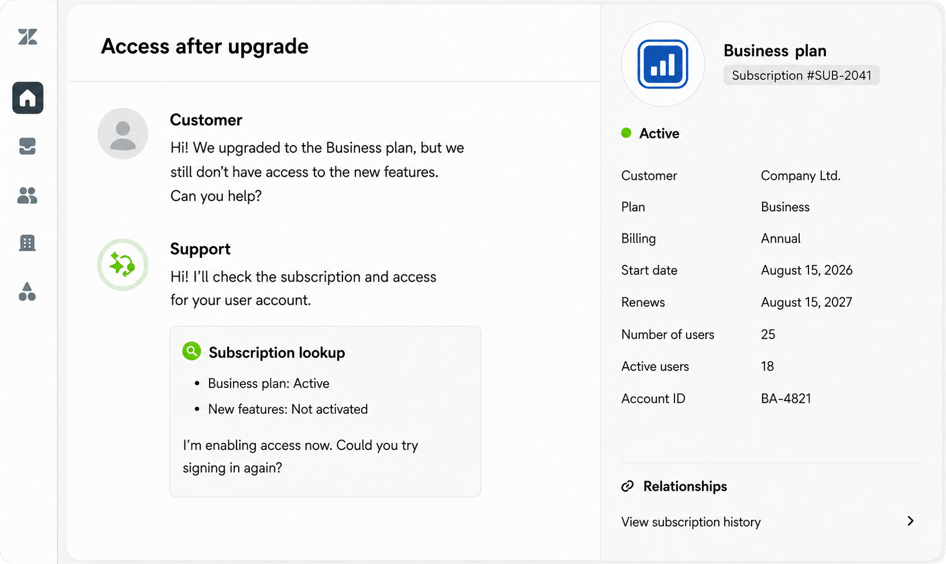
Illustration of how Custom Objects can provide relevant information directly within a customer ticket.
(For illustrative purposes only.)
Automate time-consuming tasks
As the number of customers and inquiries grows, so does the need to sort, prioritize, and escalate tickets.
Zendesk can automate parts of this process. With the right setup, subscription or billing questions can be routed to the appropriate team, while technical issues can be prioritized according to their nature. Follow-ups can also be automated when a ticket has been waiting for a response for a certain amount of time.
With intelligent triage, new inquiries can be classified automatically as soon as they are created. This can include information such as the topic, language, and sentiment of the message – for example, whether it is positive, neutral, or negative.
These classifications can also be used for reporting. Support teams get a clearer picture of what customers need help with without relying entirely on manual categorization. It also becomes easier to identify situations where several customers are reporting the same issue or asking about the same feature.
Help customers find answers themselves
A good help center is particularly valuable when many customers need help with the same topics.
It can bring together guides and answers covering areas such as setup, user access, integrations, APIs, features, and known issues.
Customers can find answers when it suits them, including outside business hours. At the same time, support teams spend less time answering the same questions repeatedly.
For this to work well, the content needs to be easy to find and kept up to date as the product evolves. The same guides can also help employees provide clear and consistent answers when responding directly to customers.
This is especially useful for SaaS companies that release new features regularly. If many customers ask the same question after a launch, it may indicate that information is missing from the help center or that existing content needs to be improved.

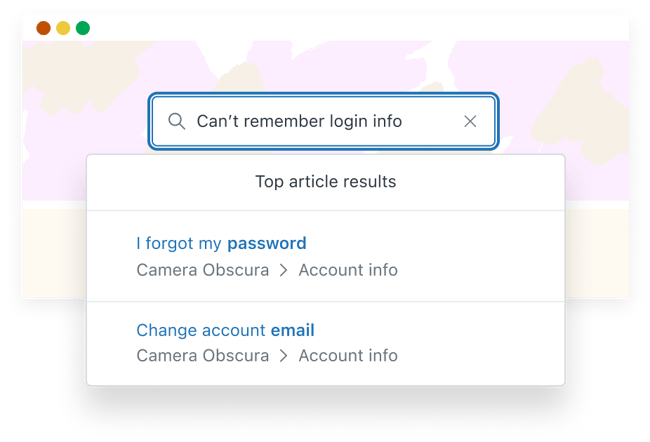
A searchable help center makes it easier for SaaS customers to find answers about setup, access, integrations, and features on their own.
Illustration from Zendesk.
Use AI to support customer service
AI can assist both customers who need help and the agents handling their requests.
With Zendesk AI Agents, common inquiries can be answered automatically using information from the help center and other connected knowledge sources. For a SaaS company, this could include questions about login, user access, subscriptions, integrations, and features.
Through connections to APIs and other data sources, responses can also draw on information from the customer’s account, subscription, or product. Depending on the setup, AI Agents can perform actions in systems connected to the solution.
If a ticket needs to be escalated, the information already collected can follow it, giving the next person more context.
Zendesk Copilot supports agents as they work on tickets by summarizing long conversations, suggesting responses, and providing guidance on next steps. Auto Assist can also help agents follow established workflows and approve actions from within Zendesk.
This can be particularly useful following a product launch or when many customers need help with the same feature. Frequently asked questions can be handled automatically, giving agents more time to focus on issues that require troubleshooting, judgement, or deeper product knowledge.
Learn more about Zendesk AI Agents and Zendesk Copilot
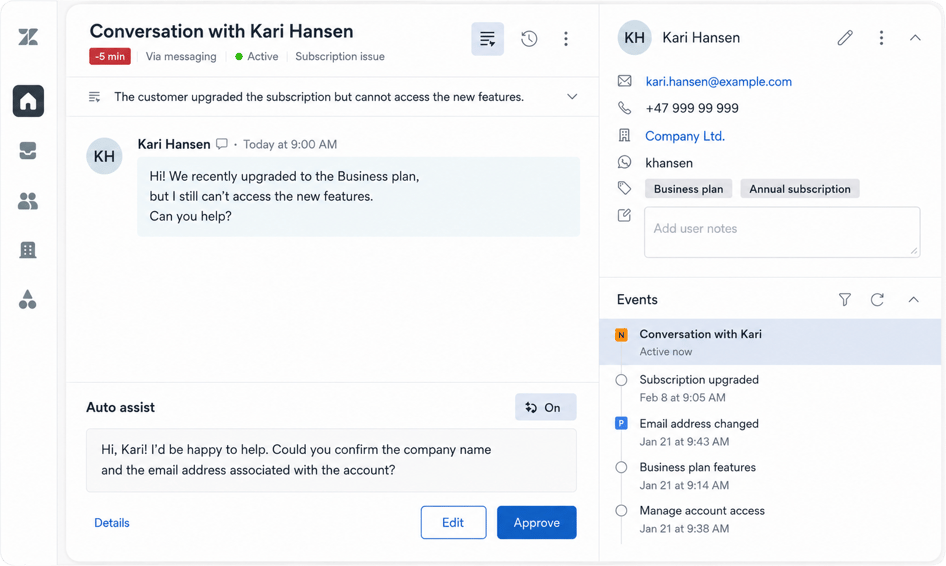
Illustration showing how Zendesk Copilot can suggest responses when a customer needs help with their subscription or access to the product.
(For illustrative purposes only.)
Escalate technical issues to the right team
Not every issue can be resolved by the customer service team alone.
A customer reporting a problem may have uncovered a software bug that needs further investigation. An operational issue may require input from a technical team, while questions about subscriptions or billing may need help from finance.
This type of collaboration is common in SaaS companies, where support, product, and development teams often need to work together on the same issue.
Customers shouldn’t have to worry about how responsibilities are divided internally. What matters is that someone takes ownership, follows up, and keeps them informed.
Zendesk can integrate with other systems the company already uses, making it easier to pass technical issues, software bugs, and other requests to the right team without losing important context.
With Action Builder, teams can create workflows between Zendesk and external solutions. This can be useful when customer service works closely with technical, product, or other internal teams.
Everyone doesn’t need to work in the same system. What matters is that the ticket can be tracked across systems and that the relevant information follows it throughout the process.
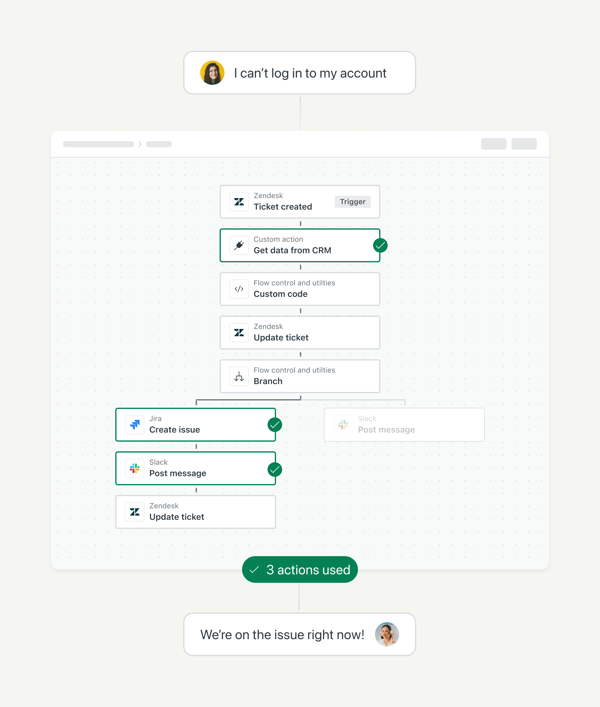
Illustration of Action Builder. An action flow can retrieve information from connected systems, update the ticket, and initiate the appropriate follow-up.
Use customer feedback to improve the product
Support inquiries are not only about resolving individual tickets. They can also reveal where customers are struggling with the product.
A high number of questions about a new feature may suggest that something needs to be explained more clearly. Recurring issues with an integration can provide useful input for the product or development team. An increase in questions about user access may indicate that the setup process is unclear.
Zendesk reporting can help teams track recurring questions, ticket volumes, and response times.
For SaaS companies, these insights can be useful beyond the customer service team. Recurring issues and customer feedback can give product teams a clearer picture of where customers experience friction and where improvements may be needed.
After a launch, for example, it can be useful to monitor whether certain features or changes are generating more support requests than expected.
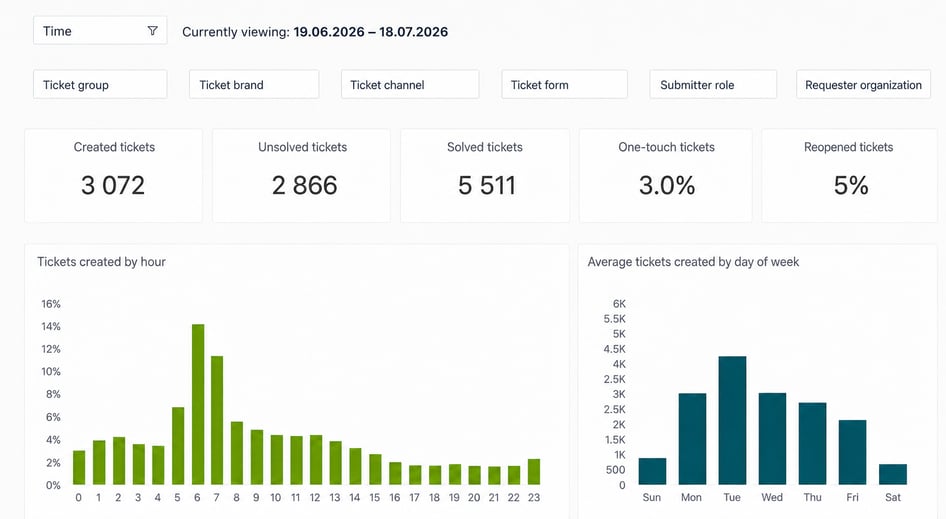
Reports in Zendesk can help the company identify trends in ticket volume, response times, and recurring support needs.
Start with what your company needs
Zendesk offers a wide range of functionality, but you don’t need to implement everything at once.
A good place to start is by bringing customer interactions together, establishing clear responsibilities, and giving employees the information they need to help customers effectively.
From there, you can add automation, a help center, AI, and integrations where they create value.
The right setup will depend on your product, the systems you already use, your customers’ needs, and how your teams work together.
As a Zendesk partner, we at Kundelab help SaaS companies set up and develop Zendesk so that it works in day-to-day operations – even as the product, customer base, and needs evolve.
Want to see how Zendesk could improve the customer experience and help your support team work more efficiently? Get in touch with one of our Zendesk experts for a no-obligation conversation.
Want to learn how Zendesk can help improve the customer experience and make customer service more efficient in your SaaS company? Get in touch with one of our Zendesk experts for a no-obligation conversation.