Zendesk continues to expand the platform with new features and improvements. Here are the key updates for August 2026.
Support
Automatic refresh for views
Views now refresh automatically every minute, ensuring ticket counts and view contents stay up to date without requiring agents to manually refresh the page. During bulk actions, automatic refresh is temporarily paused to prevent selected tickets from changing while work is in progress.
Create service requests on behalf of another user
Authorized users can now create service requests on behalf of another user. The person the request is created for is automatically assigned as the requester, while the person submitting the request is added as a CC so they can follow the request.
Improved performance for ticket forms with many custom fields
For ticket forms with more than 70 custom fields, Zendesk now displays the first 50 fields when a form is opened. The remaining fields can be displayed by selecting Show more. This update improves performance for ticket forms with a large number of custom fields.
Manage organization assets directly from a ticket
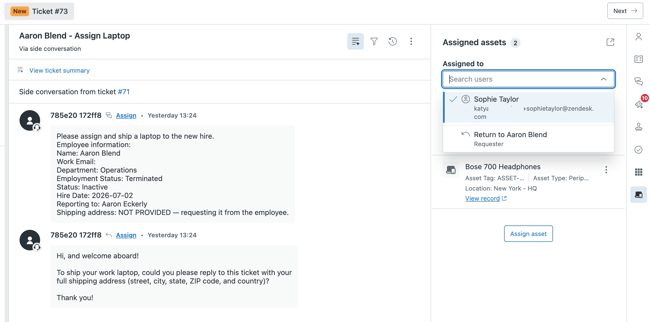
The Asset Management sidebar now lets agents switch between user and organization views, making it possible to manage shared or organization-owned IT assets directly from a ticket.
Improved visibility into tasks
Agents can now view events related to task lists and individual tasks, including when task lists are created, completed, or reopened, and when tasks are marked as complete or incomplete.
Enhanced notifications in Agent Workspace
Agent Workspace notifications now include several improvements:
-
Audio notifications for ticket updates
-
Browser tab notifications for new tickets and ticket updates
-
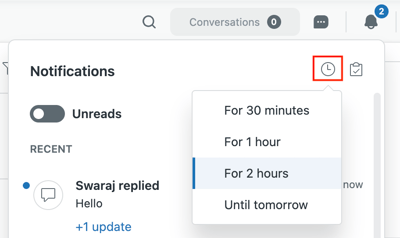
The ability to temporarily pause notifications
-
A notification list that only displays unresolved tickets
Select a different user when managing assets
When multiple users are associated with the same account, agents can manage assets for another user without changing the requester assigned to the ticket.
AI agents
AI agents platform update
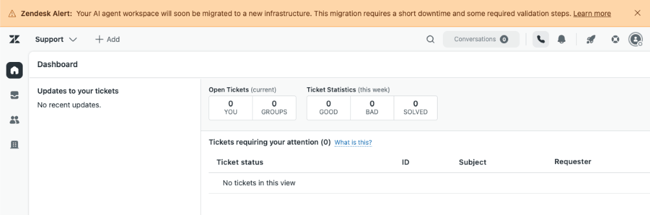
Zendesk is updating the AI agents platform for customers who purchased AI agents - Advanced before March 10, 2026.
The update includes a unified connection to Zendesk Help Center, support for language-specific search rules, support for article permissions, the new Zendesk Web Crawler, and additional built-in connections to external knowledge sources.
Existing CSV imports will continue to work, while new CSV imports will be temporarily unavailable during the migration.
Copilot
Intelligent Triage is now included in more plans
Copilot Intelligent Triage is now included with Suite Professional, Support Professional, and higher plans.
The feature automatically classifies incoming tickets based on attributes such as topic, language, sentiment, and key entities. It can also provide AI-powered workflow recommendations.
Auto assist supports external knowledge sources
Auto assist can now generate recommendations using external knowledge sources, including Confluence, Notion, and Zendesk Web Crawler, in addition to internal knowledge base articles.
Use resolved tickets as a knowledge source
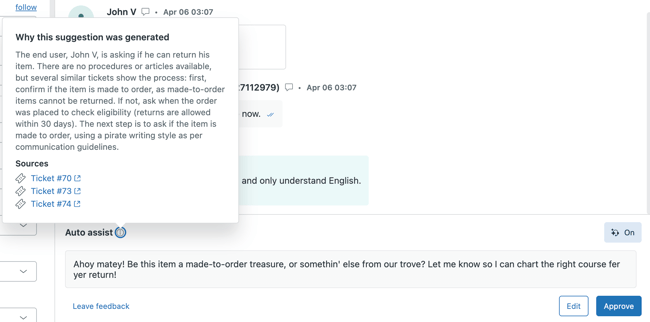
When relevant procedures or knowledge articles aren't available, Auto assist can use similar resolved tickets as the basis for response recommendations. Agents can also see which tickets and sources were used to generate each recommendation.
Admin Copilot in Launchpad
Admin Copilot now provides recommendations in Launchpad to help administrators configure and optimize Zendesk.

Accounts & Billing
AI-powered setup
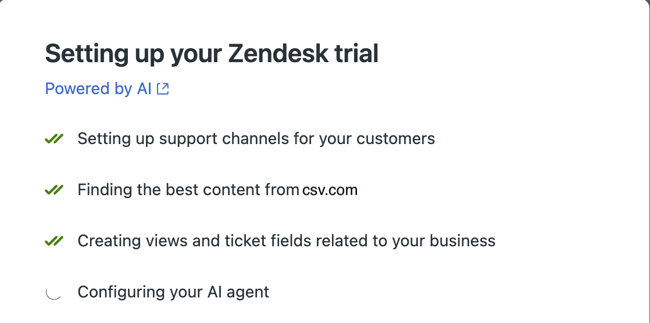
Zendesk Suite Trial now includes an AI-powered setup experience that helps new customers configure their account.
The setup experience uses information from your organization's website to automatically configure parts of your account.
Security
Automatic sign-out for suspicious activity
If Zendesk detects suspicious activity, users may be automatically signed out. After signing in again, they'll be returned to the page they were previously working on.
People
New permission for managing Support apps
Enterprise customers can now grant selected users permission to install, configure, and remove Support apps without granting full administrator access.
Knowledge
New content components in the article editor
The article editor now supports:
-
Accordions
-
Callouts
-
Tabs
These components make it easier to organize and highlight content directly within the editor without requiring custom code.
Additional external knowledge sources
The following services can now be connected as external knowledge sources:
-
Dropbox
-
Jira
-
Freshdesk
-
Contentful
Content from these services can now be used wherever Zendesk supports external knowledge sources.
Contact Center
Live call transcription
Agents can now view a live transcript while a voice call is in progress.
Enhanced call transfers
When transferring calls, agents can now see the availability of other agents and queues before completing the transfer.
Auto-accept calls
Administrators can configure automatic call acceptance for individual agents.
Support for Jabra devices
Agents can now control calls using the buttons on compatible Jabra headsets.
Browser notifications
Incoming calls can now be displayed as browser notifications, including the caller's phone number. Agents can also test browser notifications directly from their settings.
Agent logs
Agent logs are now available and can be used when troubleshooting issues together with Zendesk Support.
Voice
Live call transcription
Voice now supports live call transcription. Transcripts include timestamps, speaker identification, searchable text, and support for language switching.
New ringtones
Agents can now choose from 20 different ringtones and adjust ringtone volume directly in the call console.
Auto-accept calls
Phone lines can now be configured for automatic call acceptance. Administrators can choose whether calls are connected immediately or after a delay of 5 or 10 seconds.
Workforce Management
New permissions structure
Zendesk Workforce Management now includes a new roles and permissions structure. Administrators can configure more granular permissions, and teams can now be granted read-only access.
Quality Assurance
Multi-level root causes
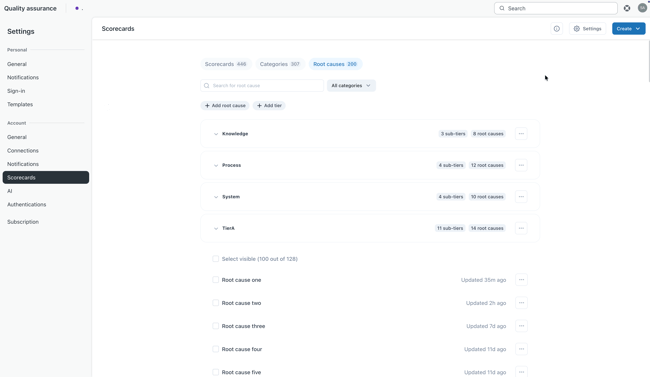
Quality Assurance now supports up to three levels of root causes when evaluating tickets, making it possible to categorize review results in greater detail.
Apps & Integrations
New Action Builder capabilities
Action Builder now supports:
-
Custom variables
-
Loop steps
-
Step-level error handling
-
Search for triggers and actions
Additional integrations
Action Builder now also supports integrations with:
-
ServiceNow
-
monday.com
-
Microsoft Planner
-
Azure DevOps
-
Microsoft Dynamics 365 Sales
-
Dynamics 365 Business Central
-
HiBob
-
Iterable
-
New Relic
-
Snowflake
Updates
API tokens removal
API tokens removal is a phased discontinuation of API tokens as an authentication method for Zendesk Support APIs. Starting July 28, 2026, unused tokens will auto-deactivate, new token creation will be blocked from October 27, 2026, and all tokens will be permanently disabled by April 30, 2027. Customers must migrate integrations to OAuth for improved security.
Learn more about migrating from API tokens to OAuth.
Updated Messaging Web Widget
The messaging Web Widget includes a new minimalistic styling preset and enhanced customization APIs for the conversation list and message log. This update offers a compact, modern chat UI with options to hide avatars, timestamps, previews, and bubble backgrounds.
We're here to help you implement new capabilities and get more value from your Zendesk solution.