
Customer service in industrial and manufacturing companies involves more than answering simple questions. An inquiry may concern an order, delivery, spare part, technical issue, or service agreement and may involve several departments. With Zendesk, customer interactions can be brought together in one place, while employees have access to the information they need to follow up on each inquiry.
Customer service requires cross-departmental collaboration
An industrial or manufacturing company may receive inquiries from distributors, dealers, suppliers, and end customers. These inquiries may reach different parts of the company and require input from several departments.
If customer communication is spread across different channels, it becomes difficult to see who is responsible and what has already been done. Employees spend time searching for information, and customers may have to explain the same issue several times.
Zendesk is a contact center solution that brings together inquiries from email, phone, chat, contact forms, and other channels in one system. Each inquiry is recorded as a ticket where the conversation, status, and ownership can be tracked. This allows several departments to collaborate without losing track of the issue.
For example, a distributor might send an email about a delayed delivery and later call for an update. In Zendesk, the conversation is kept together, allowing the employee to quickly see what the inquiry is about and what the customer has already been told.
Route inquiries to the right person
Many inquiries in industrial and manufacturing companies require specialist knowledge. A question about a delivery may need to go to logistics, while a technical issue should be handled by someone familiar with the product.
Contact forms in Zendesk can be customized so that customers provide the necessary information from the start. This might include the product, order number, type of inquiry, and severity level. Customers can also attach a photo of the problem if attachments are enabled. This information makes it easier to understand the issue and route it to the right team.
Routing can also be automated. A technical inquiry can be sent directly to product support, while a question about spare parts goes to the appropriate department. Critical cases can be prioritized so that issues affecting the customer’s operations are addressed quickly.
For companies with different service agreements, SLA rules in Zendesk can be used to set targets for response times, update intervals, and resolution times. This gives employees a clearer view of urgent cases and makes it easier to meet the service levels agreed with each customer.
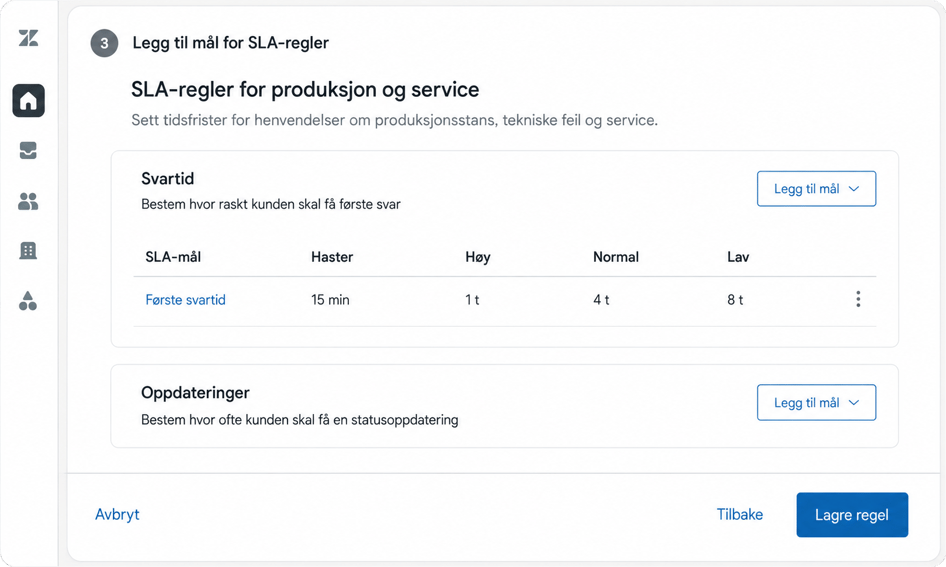
Illustration of how SLA rules can be set up in Zendesk for production and service cases. (The image is for illustrative purposes only.)
Gather relevant product and order information
To assist the customer, it is often necessary to look beyond the inquiry itself. The agent may need information about the product, order, delivery, service agreement, or equipment the customer is using.
Through integrations, relevant information from order management, logistics, and other business systems can be made available in Zendesk. What is displayed depends on the systems and the company’s setup. This gives the agent better context without having to search across multiple systems.
Zendesk also supports custom objects. These can be used to record and connect information about products, orders, contracts, machines, and other equipment.
When this information is linked to the ticket, it becomes easier to see which product or order the inquiry relates to. The agent can access relevant information alongside the customer conversation, making it easier to provide an accurate response and follow up on the case.
Zendesk can be integrated with the systems the company uses for order management, inventory, and service. This makes relevant information from these systems available to the agent when following up on an inquiry.
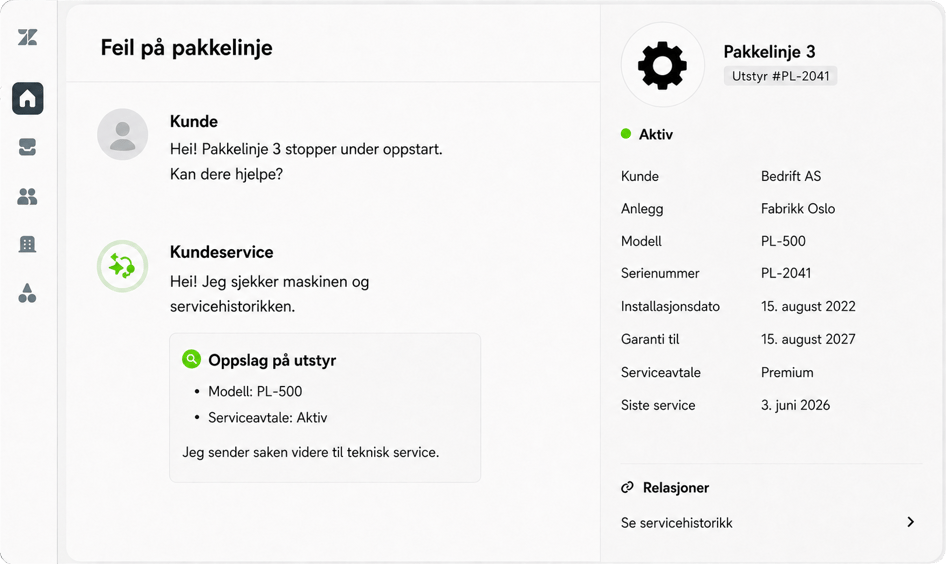
Illustration of how custom objects can provide relevant information directly within a ticket.
(The image is for illustrative purposes only.)
Make technical knowledge easier to find
Industrial and manufacturing companies often have large amounts of product documentation. This information may be stored in manuals, PDF files, and folders, or held by experienced employees. When a customer needs help, a lot of time can be spent trying to find the right document or person.
With Zendesk Knowledge, the company can build a help center featuring installation guides, product manuals, maintenance tips, and answers to common technical questions. Customers and partners can then find information on their own without having to wait for a response from customer service.
The same content can also support employees who handle inquiries. When information is centralized and kept up to date, it becomes easier to provide consistent and accurate responses across customer service, technical support, and service teams.
A good help center does not replace the company’s technical expertise. It makes that expertise more accessible and reduces the time spent answering recurring questions.
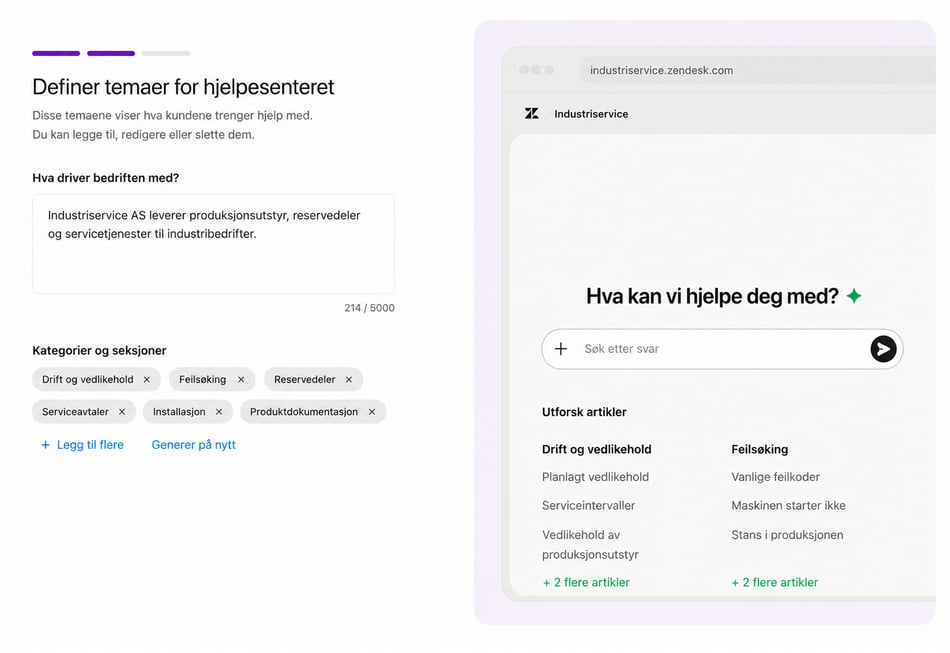
The image illustrates how Zendesk Knowledge can use historical ticket data and business context to suggest a structure and draft articles for review. (The image is intended as an example only.)
AI can handle common questions and assist support teams
For industrial and manufacturing companies, many inquiries cover the same topics. Customers may want to know the status of an order, find documentation for a product, or get help ordering the right spare part.
Zendesk AI Agents can use content from the help center and other connected knowledge sources to answer common questions. With the right integrations and setup, AI Agents can also retrieve information, such as order status, or collect the necessary details before the inquiry is passed on.
If the inquiry is complex or urgent, it can be transferred to a human agent along with the information that has already been gathered. The customer does not have to start over, and the agent has a better basis for providing assistance.
When an agent needs to follow up on a ticket, Zendesk Copilot can summarize the conversation, suggest responses, and recommend next steps. These suggestions may be based on procedures, ticket information, and help center content. This can make it easier to handle technical inquiries quickly and consistently.
The goal is not to automate every technical inquiry. AI is most useful when the company has clear and up-to-date information and the tasks are well defined. AI can then handle more of the repetitive work, while employees spend their time on cases that require experience and judgment.
Learn more about Zendesk AI Agents and Zendesk Copilot
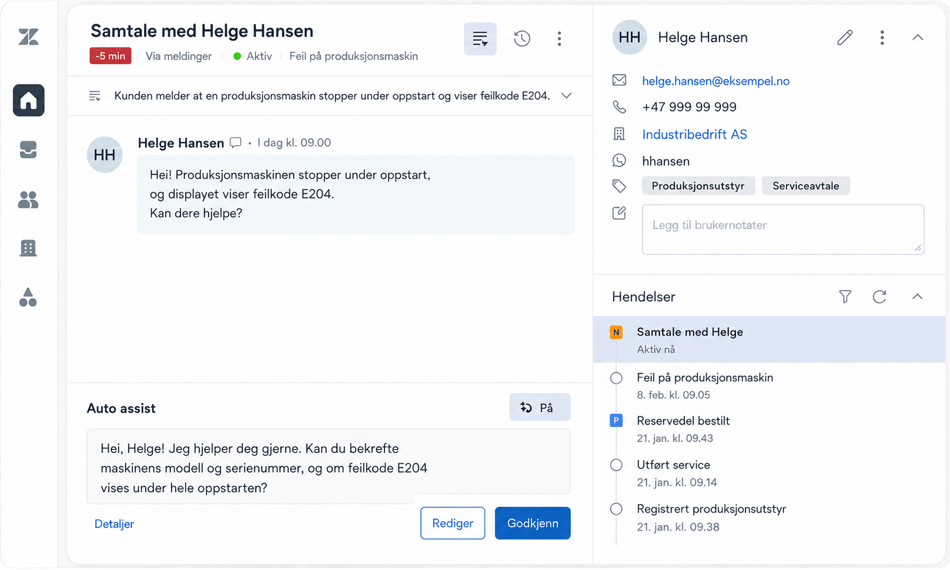
Illustration showing how Zendesk Copilot can suggest responses when a customer needs help with a product.
(The image is for illustrative purposes only.)
Customer service provides insights into products and workflows
When inquiries are recorded in a structured way, customer interactions can provide valuable insight for the rest of the company. For example, tickets can be categorized by product, type of issue, severity, order, or customer group.
Reports in Zendesk can show the number of inquiries, response times, resolution times, and recurring issue types. Custom fields can be used to record information relevant to the company, making it easier to identify patterns over time.
If many customers ask about the same product or procedure, it may be a sign that the documentation needs improvement. Recurring issues related to a product or delivery can also provide useful information for product development, quality management, logistics, or other parts of the company.
Customer service is therefore more than a function that receives and resolves inquiries. Customer interactions also become a structured source of knowledge about where customers encounter problems and what the company should investigate further.
The right setup matters more than the number of features
Industrial and manufacturing companies have different products, customers, and workflows. Some focus primarily on technical support and service agreements, while others need better control of order inquiries, requests from distributors, or spare-part orders.
Zendesk should therefore be configured around how the company actually works. This involves mapping the types of inquiries it receives, the information employees need, and who should follow up on the different cases.
At Kundelab, we help companies tailor Zendesk to these needs. The goal is to establish a well-structured solution that provides a clear overview from the start and can be further developed with integrations, automation, and AI when these add value.
Wondering how Zendesk could be used in your industrial or manufacturing company? Contact one of our Zendesk experts for a no-obligation chat.
Wondering how Zendesk can be used in your industrial or manufacturing company? Contact one of our Zendesk experts for a no-obligation chat.